

As an Amazon Associate, I earn from qualifying purchases. En calidad de Afiliado de Amazon, obtengo ingresos por las compras adscritas que cumplen los requisitos aplicables. If you buy through these links, the price is the same for you and Amazon pays me a small commission that helps keep Tecnoyfoto running.

Last Updated: April 21, 2026
In a tech landscape where WiFi 7 is already on the horizon, choosing a router has become more strategic than ever. For homes and small offices looking for the perfect blend of proven performance, robust security, and a reasonable price point, the Synology WRX560Affiliate link remains one of the smartest buys on the market in 2026. This isn’t just another WiFi 6 router; it’s a complete network command center, powered by its incredible operating system, Synology RouterAffiliate link Manager (SRM).
In this updated Synology WRX560 review, I’ll walk you through my hands-on experience with this device, breaking down its key features, running real-world performance tests, and stacking it up against its direct competitors. You’ll discover why its powerful network segmentation capabilities and advanced software make it an essential piece of hardware for any home or prosumer network that takes security and flexibility seriously.
Synology WRX560: Key Technical Specifications
Before we dive into performance, here’s a quick look at what this router is packing under the hood. These specs are the foundation of its power and versatility.
| Feature | Specification |
|---|---|
| Processor | Quad-core @ 1.4 GHz |
| RAM | 512 MB DDR4 |
| WiFi Standard | WiFi 6 (802.11ax) |
| Frequency Bands | Simultaneous Dual-Band (2.4 GHz / 5 GHz) |
| Max Throughput | Up to 3000 Mbps (AX3000): 600 Mbps on 2.4 GHz + 2400 Mbps on 5 GHz |
| Ports | 1 x 2.5 GbE WAN/LAN, 1 x 1 GbE LAN (configurable as secondary WAN), 2 x 1 GbE LAN, 1 x USB 3.2 Gen 1 |
| Antennas | 4×4 MIMO (Internal) |
| Key Features | Synology SRM, Mesh Networking, Network Segmentation (VLAN), VPN Plus, Threat Prevention |
Design and Build: Functional Minimalism
One aspect that still holds up beautifully in 2026 is its design. The Synology WRX560 sports a vertical tower form factor with internal antennas. This minimalist approach is a breath of fresh air, blending into home decor instead of looking like a robotic spider or a stealth bomber. The high-quality plastic construction and ample ventilation ensure efficient heat dissipation, which is critical for maintaining 24/7 performance without throttling.
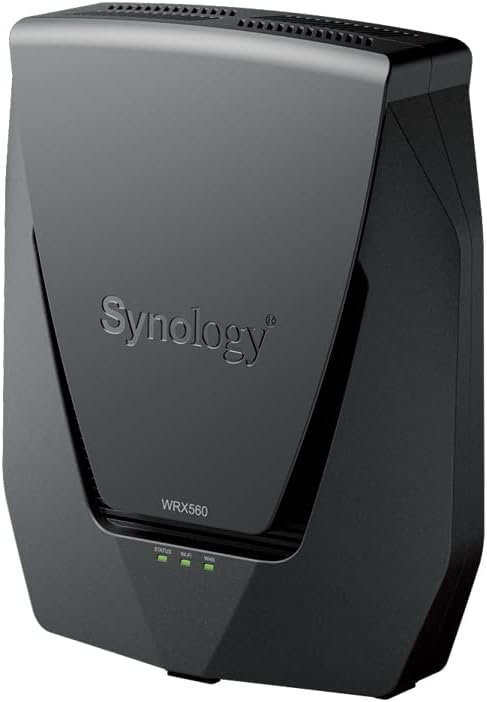
Even without adjustable external antennas, the coverage is surprisingly solid. Synology clearly optimized the internal layout to deliver a strong, stable signal that can easily cover a medium-sized home without dead spots.
2026 Real-World Performance Tests
In a world where 1 Gbps fiber connections are the norm, how does the WRX560 hold up? I put it through its paces to see if it still has what it takes. While WiFi 7 is the new kid on the block, WiFi 6 remains the dominant and more-than-capable technology for 99% of users.
| Test Scenario | Results | Key Takeaways |
|---|---|---|
| LAN to NAS Speed (2.5 Gbps Port) | ~280 MB/s (sustained) | Perfect as the best router for a NAS. Large file transfers are incredibly fast, nearly saturating the 2.5 GbE connection. |
| WiFi 6 Speed Test (5 GHz, at 10 ft / 3 meters) | 940 Mbps / 935 Mbps (Down/Up) | Easily maxes out a 1 Gbps fiber connection. Latency stayed at a crisp 2-3 ms, perfect for gaming and 4K/8K streaming. |
| WiFi Coverage Test (at 33 ft / 10 meters, 2 walls) | 450 Mbps / 420 Mbps | The signal remains strong and stable, proving the quality of its internal antennas. Great for multi-room homes. |
| Heavy Load (25+ IoT devices) | No performance drops | Thanks to WiFi 6’s OFDMA and MU-MIMO, the router flawlessly handles a busy network loaded with smart home gadgets like the ones we use in Home Assistant. |
Synology Router Manager (SRM): The Game-Changing OS
The real reason to buy the WRX560 isn’t the hardware—it’s the software. Synology SRM is a full-fledged, desktop-class operating system accessible from your browser, offering a level of granular control that few competitors can match.
- Intuitive, Desktop-Like Interface: If you’ve ever used a Synology NAS, you’ll feel right at home. It’s a system of windows, icons, and menus that makes network management a breeze.
- Network Segmentation (VLANs): The Killer Feature: You can create up to 5 completely isolated wired and wireless networks. This is a security game-changer: one network for your work devices, another for guests, and a third for your often-insecure IoT devices (cameras, smart plugs, etc.). This prevents a vulnerability in one compromised device from spreading to your main network. To learn more, I highly recommend reading our guide on how to segment your home network.
- VPN Plus Server: Turn your router into a powerful VPN server at no extra cost. It allows you to securely connect to your home network from anywhere in the world, perfect for remote work or accessing your files privately.
- Parental Controls & Safe Access: A comprehensive suite to protect your kids online. You can create user profiles, filter content by category, set internet schedules, and monitor usage. It’s one of the most robust implementations I’ve ever tested, easily surpassing many paid solutions.
- Threat Prevention: An Intrusion Prevention System (IPS/IDS) that actively scans traffic in real-time to block malware and other threats before they ever reach your devices.
Advanced Setup and Use Cases
The Synology WRX560 setup is straightforward for a basic user, but its advanced capabilities are where it truly shines.
- Synology Mesh Network: If you have a large home, you can add another Synology routerAffiliate link (like a second WRX560 or an RT6600ax) to create a seamless Synology mesh network. The handoff between nodes is transparent, and everything is managed centrally in SRM, giving you flawless coverage with no dead zones.
- The Ultimate Router for a NAS: That 2.5 Gbps port is its secret weapon. When connected to a compatible NAS, like those from Synology or TerraMaster, it obliterates the 1 Gbps bottleneck, allowing for lightning-fast backups and media file transfers. It’s the perfect companion for high-performance hard drives.
- Smart Home Powerhouse: Its rock-solid stability is crucial for systems like Home Assistant. By segmenting your network, you can isolate all your Zigbee or Z-Wave devices (connected via coordinators like the SMLIGHT SLZB-06) on their own VLAN, dramatically increasing your smart home’s security posture.
Synology WRX560 vs. The Competition in 2026
To put things in perspective, here’s how the WRX560 stacks up against two popular rivals in its price range as of 2026.
| Feature | Synology WRX560 | ASUS RT-AX86U Pro | TP-Link Archer AXE75 |
|---|---|---|---|
| WiFi Standard | WiFi 6 (AX3000) | WiFi 6 (AX5700) | WiFi 6E (AXE5400) |
| Multi-Gig Port | 1 x 2.5 GbE (WAN/LAN) | 1 x 2.5 GbE (WAN/LAN) | None (1 GbE Ports Only) |
| 6 GHz Band | No | No | Yes |
| Software Advantage | Synology SRM (Vastly Superior) | ASUS AiMesh / AiProtection | TP-Link HomeShield |
| Segmentation (VLAN) | Native & dead simple to use | Yes, but more complex (may require Merlin firmware) | Yes, but more limited |
| Estimated Price Range | $220 – $260 | $250 – $300 | $200 – $240 |
As you can see, while the TP-Link offers WiFi 6E and the ASUS has higher theoretical speeds, neither comes close to the power and usability of Synology’s SRM software. If you value control, security, and advanced features over the very latest WiFi spec, the WRX560 is still the clear winner.
Synology WRX560: Pros & Cons
Pros
- Synology SRM: The best router OS on the market, period.
- Easy Network Segmentation: Dead simple to configure and essential for modern security.
- 2.5 Gbps Port: Future-proof for faster internet and a must-have for any NAS owner.
- Rock-Solid Stability: A true ‘set-it-and-forget-it’ device. Zero reboots required in months of use.
- VPN Plus at No Cost: A complete, lifetime-free VPN solution built-in.
- Excellent features for the price.
Cons
- No WiFi 6E: Lacks the 6 GHz band, which offers less interference in very crowded environments.
- Only One Multi-Gig Port: Having at least two 2.5 Gbps ports would have been ideal.
- Vertical Design: While sleek, it might not fit in all media centers or entertainment units.
Price and Where to Buy
The Synology WRX560 has maintained a very competitive price point. In 2026, you can typically find it for between $220 and $260. Considering its SRM software provides features that would require subscriptions or enterprise-grade hardware from other brands, the investment is fully justified for anyone who needs more than a simple WiFi access point.

Affiliate link
Synology WRX560 Router
- High-Performance WiFi 6 Router
- Advanced SRM Operating System
- 2.5 Gbps WAN/LAN Port
The Verdict: Is the Synology WRX560 Still Worth It in 2026?
After putting it through its paces again, my conclusion is a resounding yes. The Synology WRX560 isn’t the fastest router on paper, but it is, without a doubt, one of the smartest and most secure routers you can buy in its price bracket. Its true value isn’t in having the latest WiFi standard, but in the powerful software ecosystem that surrounds it.
If you’re a power user, a remote professional, a smart home enthusiast, or just someone who values security and control over their network, this router is an exceptional investment. The ability to easily create segmented networks, its powerful VPN server, and its robust security tools make it a prosumer solution at a consumer price. For me, it remains the top recommendation for anyone looking for a brain for their network, not just a signal booster.
Continue reading

Next related guide · 10 min read
Synology VPN Plus: The Ultimate Guide to Secure Remote Access in 2026
Last updated on April 21, 2026 In 2026, where remote work, data security, and access to our home network are more critical than ever,…
Continue with this article