

Last updated on February 2, 2026
In 2026, Home Assistant has cemented its place as the gold standard open-source platform for smart home automation. It’s evolved far beyond a hobbyist’s tool into a mature ecosystem that puts local control and privacy above all else. In this guide, I’ve broken down everything that defines Home Assistant today—from its slick UI and powerful automation engine to the must-have integrations and security practices every user needs to know.
What’s New? The Evolution of Home Assistant in 2026
If you’ve been using Home Assistant for a few years, you’ve seen the evolution. The pace of updates has shifted from introducing niche features to building an incredibly robust and user-friendly system. The core philosophy is no longer just *”what can you do?”* but *”how easily and intelligently can you do it?*”
The UI: Dynamic Dashboards and Game-Changing Subviews
One of the most significant improvements that has matured over time is dashboard flexibility. What started as a simple grid of cards is now a fully customizable canvas. Subviews, once a novel feature, are now a cornerstone of a clean Home Assistant setup. They let you create minimalist, uncluttered interfaces by hiding complexity until it’s needed.
For example, my main dashboard has a single “Climate Control” button. Tapping it doesn’t navigate to a new page; it opens a subview with all the detailed controls for my Airzone system. When I’m done, I just hit “Back” and return to the main screen. It keeps navigation tidy and contextual.
The Automation Editor: Where UI and YAML Finally Make Peace
The age-old debate between the visual UI editor and raw YAML code is officially over. In 2026, the automation editor is a powerhouse tool that satisfies both camps. You can now open a complex, hand-coded YAML automation, and the editor visualizes it perfectly, allowing you to understand its logic at a glance.
This bidirectional translation is a game-changer. I can prototype a complex automation in the UI, switch to YAML to learn from the generated code or fine-tune it, and then switch back to the UI without breaking anything. For anyone still learning the ropes, it’s an incredible teaching tool. To dive deeper into the fundamentals, I recommend my complete guide to advanced YAML.
Key Integrations for a 2026 Smart Home
A smart home platform is only as good as the devices it can control. In this arena, Home Assistant remains the undisputed champion, thanks to its open architecture and a relentlessly innovative community.
Unified Protocols: Zigbee, Z-Wave, and Matter
The days of protocol fragmentation are behind us. Home Assistant acts as a universal bridge. Personally, I manage my Zigbee network using two of the best tools available:
- ZHA (Zigbee Home Automation): The native, built-in integration. It’s the ideal starting point due to its simplicity.
- Zigbee2MQTT: This is my preferred choice for its sheer flexibility and support for a massive library of devices. The initial setup can be more involved, but the power it unlocks is well worth the effort.
For any serious Zigbee setup, a reliable coordinator is non-negotiable. I personally use and recommend a Zigbee Ethernet coordinator like the SMLIGHT SLZB-06, which provides a far more stable connection than the typical USB dongle.
Direct Firmware Updates: The Shelly Standard
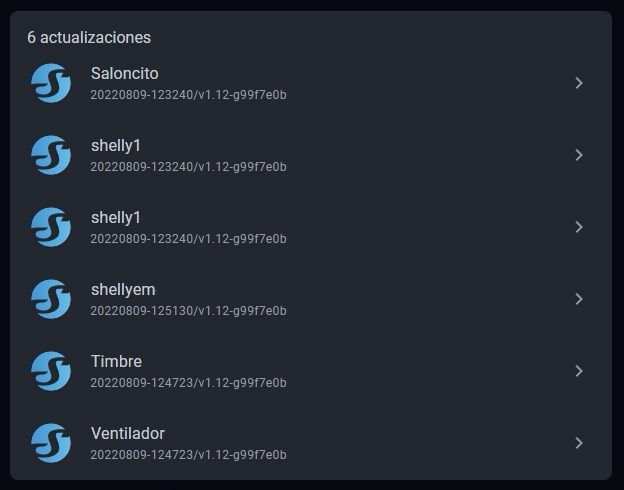
One of the quality-of-life features we take for granted in 2026 is updating device firmware directly from the Home Assistant interface. Brands like Shelly pioneered this, and now it’s an expected standard. You no longer need to open a separate manufacturer’s app to keep your smart relays, bulbs, or sensors up to date. A single click on the update notification in Home Assistant handles the rest, ensuring you have the latest security patches and features.
Data Integration and Backups
Home Assistant’s ability to collect and leverage data is staggering. One of the most useful Home Assistant integrations I set up in every instance is with Google Sheets. It allows me, for example, to log a long-term history of temperatures, energy consumption, or security events to a spreadsheet for later analysis.
This connection to cloud services is also vital for disaster recovery. I have my backups configured to save automatically to the cloud, and for that, there’s nothing better than the Google Drive Backup integration. It ensures my entire configuration is safe, no matter what happens.
Tutorial: Cozy Winter Evening Wellness Automation
To show off the power of Home Assistant 2026, here’s a real-world automation I created that combines multiple sensors and services to create the perfect relaxing atmosphere:
- Trigger: When the Workday sensor detects it’s a workday and my presence is detected at home after 6:00 PM.
- Conditions:
- The sun has already set (using the `sun.sun` entity).
- The outside temperature, pulled from OpenWeatherMap, is below 50°F (10°C).
- Actions:
- The living room lights turn on to a warm white at 40% brightness.
- The thermostat is set to 70°F (21°C).
- My smart speaker plays my “Relaxing Evenings” playlist on Spotify, thanks to the media player integration.
- I get a notification on my phone that says: “Welcome home! Your winter evening scene is activated.”
This is just one example of how true smart home control goes beyond simply turning things on and off to create experiences that actually improve your quality of life.
Home Assistant Security: Essential Best Practices
With such a powerful system controlling your home, security is paramount. Ignoring it is a huge mistake. Based on my 15 years of experience, these are the non-negotiable best practices for 2026:
- Secure Remote Access: Stop opening ports on your router. The easiest and most secure option is the Home Assistant Cloud (Nabu Casa) subscription. If you prefer a self-hosted solution, a VPN like WireGuard or the one built into a Synology NAS is the best alternative.
- Strong Passwords and 2FA: Use unique, complex passwords for every user account and enable two-factor authentication (2FA). This is not optional.
- Network Segmentation: If you have some networking know-how, segmenting your home network is highly recommended. Place your IoT devices on a separate VLAN to isolate them from your personal computers and sensitive data.
- Secrets Management: Never hard-code passwords or API keys directly in your configuration files. Always use the `secrets.yaml` file, as I explain in this guide to secrets.yaml.
- Trusted Add-ons: Only install Add-ons from the official store or from developers with a solid reputation in the community. Be wary of random GitHub repositories.
By following these recommendations, you can ensure your home automation system is not only smart but also secure and resilient. For a more comprehensive breakdown, check out my full article dedicated to locking down your Home Assistant security.
Continue reading

Next related guide · 10 min read
ESPHome secrets.yaml: How to Protect Wi-Fi, API and OTA Credentials
When you start using ESPHome, it is very easy to place Wi-Fi passwords, API encryption keys and other credentials directly inside every device YAML…
Continue with this article