

Last updated on January 23, 2026
Integrating a security system into your Amazon ecosystem has gone from a niche tech project to an absolute must-have. In 2026, the best Alexa compatible security systems are no longer a novelty; they’re the standard for controlling your home’s safety with simple voice commands. From no-contract DIY kits to professionally monitored systems that dispatch police, I’ve hands-on tested the current market to bring you the definitive guide.
How to Choose the Best Alexa-Compatible Security System in 2026
Before you click ‘buy’, it’s crucial to assess your needs. Protecting a small apartment is a world away from securing a multi-story house with a yard. Here are the key factors I considered when analyzing each system:
- System Type: DIY vs. Professional Monitoring: Do you prefer a no-contract Alexa alarm system for 2026, where you manage alerts yourself, or a professionally monitored system with a monthly subscription that handles calling first responders for you?
- Depth of Alexa Integration: Every system on this list works with Alexa, but the level of integration varies wildly. Some only let you arm and disarm, while others allow their sensors to trigger advanced Alexa Routines, like turning on all the lights if motion is detected at night.
- Ease of Installation: Most modern systems are wireless and designed for DIY installation in under an hour. However, professionally monitored systems from companies like ADT often require a technician.
- Ecosystem & Scalability: Can the system grow with you? The ability to add more sensors, cameras, or even smart locks in the future is key. Brands like Ring or Aqara offer incredibly comprehensive ecosystems.
- Voice Control Security: This is non-negotiable. How does the system handle disarming by voice? The most secure options require a 4-digit voice PIN to prevent anyone from simply yelling a command from outside your window to disable your alarm.
Comparison Chart: Best Alexa Security Systems (2026)
| Model | Type | Monthly Fee (Est.) | Alexa Integration | Best for… |
|---|---|---|---|---|
| Ring Alarm (3rd Gen) | DIY (Optional Pro Monitoring) | $0 (Protect Pro plan ~$20/mo) | Excellent. Voice arm/disarm with PIN, and sensors can trigger routines. | Users deep in the Amazon ecosystem who want total flexibility and a huge device lineup. |
| SimpliSafe | DIY (Optional Pro Monitoring) | $0 (Interactive Monitoring plan ~$28/mo) | Very Good. Arm (Home/Away) and check status. Voice disarm requires a paid plan. | Those who want dead-simple setup and the option for no-contract professional monitoring. |
| ADT | Professionally Monitored | From ~$45/mo | Good. Arm/disarm, control smart locks, and check status via the ADT Skill. | Homeowners who want the peace of mind of a legacy security brand with professional installation. |
| Vivint Smart Home | Professionally Monitored | From ~$40/mo | Excellent. Deep integration for arming, checking cameras, and controlling a wide range of smart home devices. | Those looking for a premium, fully integrated smart home and security system installed by pros. |
| Aqara Security Kit (with M3 Hub) | DIY / Self-Monitored | $0 | Excellent. Every Zigbee sensor is exposed to Alexa for advanced automations. | Smart home tinkerers and DIY enthusiasts who want a modular, highly customizable system. |
The Best No-Contract Alexa Compatible Security Systems
If you prefer to be in the driver’s seat and dodge monthly fees, a self-monitored Alexa smart security system is your best bet. You’ll get instant notifications on your phone, and you decide whether to call the police. These are my top picks for 2026.
Ring Alarm (3rd Generation)
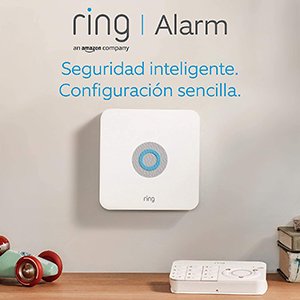
As an Amazon-owned company, it’s no surprise that Ring Alarm offers the most seamless and complete integration with Alexa. The starter kit is affordable and has everything you need to get going: a base station, keypad, one contact sensor, one motion detector, and a range extender.
My favorite feature is the ability to use the alarm’s sensors to trigger Alexa Routines. For example, you can set it up so that when the living room door’s contact sensor opens in the morning, your lights turn on and Alexa wishes you a good morning. For voice disarming, it prompts for a PIN, adding that essential layer of security.
Aqara Security Kit with Hub M3

Aqara has become a benchmark brand in the smart home world for its reliability and competitive pricing. Its alarm system, built around a hub (like the new Matter-compatible M3) and a vast array of Zigbee sensors, is incredibly versatile.
The Alexa integration is outstanding. You can’t just arm and disarm the system; every single sensor (motion, door, vibration, water leak) is exposed to Alexa. This gives you granular control to create highly specific automations. It’s the ideal choice if you plan to expand your smart home beyond just security.
Best Professionally Monitored Alarms with Alexa
The days when big security companies were wary of voice assistants are long gone. In 2026, most industry leaders offer official Alexa Skills, understanding that convenience and security can coexist perfectly.
ADT and Vivint Smart Home
Both ADT and Vivint have done excellent work integrating their professional systems with Alexa. Through their respective Skills, which you link to your customer account, you can perform key actions with your voice:
- “Alexa, ask ADT to arm my system in away mode.”
- “Alexa, tell Vivint what’s the status of my alarm.”
- “Alexa, disarm my system.” (This will require a security code by voice).
The main advantage here is peace of mind. If the alarm goes off, you don’t just get a notification; a professional monitoring center verifies the alert (often with image or audio verification) and dispatches police if necessary. It’s the “set it and forget it” option for those who prioritize professional response above all else.
Ring Alarm vs. SimpliSafe with Alexa: Which Should You Choose?
This is one of the most common questions I get. Both are fantastic DIY-friendly options, but they have key differences.
- Ecosystem: Ring wins this by a landslide. If you already have or plan to get a Ring Video Doorbell or other Ring cameras, the integration into a single app is flawless.
- Ease of Use: SimpliSafe is renowned for its extreme simplicity. The installation is foolproof, and its keypad is incredibly intuitive.
- Alexa Integration: Ring is a step ahead. It allows its sensors to be used in Routines natively, and voice disarming is available even on the free plan. SimpliSafe requires its paid monitoring plan to enable voice disarm.
- Pro Monitoring Flexibility: SimpliSafe lets you start and stop their professional monitoring service on a monthly basis with no long-term contracts. While Ring’s Protect Pro plan also offers professional monitoring, SimpliSafe’s entire brand is built around this no-commitment flexibility.
My Verdict: If you’re invested in the Amazon ecosystem and want the deepest possible integration with Alexa, Ring Alarm is the unbeatable choice. If you’re looking for the absolute easiest setup on the market and value the freedom to turn professional monitoring on and off at will, SimpliSafe is for you.
How to Connect Your Alarm System to Alexa: Step-by-Step
The general process is very similar for most systems, whether they have monthly fees or not.
- Set Up Your Hardware: Follow the manufacturer’s instructions to place your sensors and configure the base station. Make sure everything works correctly from its own official app first.
- Enable the Alexa Skill: Open the Alexa app on your phone, go to “More” > “Skills & Games,” and search for the skill for your alarm’s brand (Ring, ADT, Aqara, etc.).
- Link Your Accounts: Tap “Enable to Use.” You’ll be prompted to sign in with the username and password for your alarm’s app. This authorizes Alexa to control your system.
- Discover Devices: Once linked, Alexa will scan for new devices. It should find your alarm system as a new security device.
- Set Your Voice Code (CRUCIAL!): In the alarm device settings within the Alexa app, enable the “Disarm by voice” toggle and set a 4-digit PIN. Never, ever skip this step.
That’s it! You can now say commands like “Alexa, arm my home” or “Alexa, disarm my home with PIN 1-2-3-4.”
FAQ: Common Questions About Alarms and Alexa
Is it safe to control my alarm with my voice?
Yes, as long as you require a PIN code to disarm. Arming the system typically doesn’t require a code since it doesn’t compromise security. The risk is that someone from outside your home could shout the disarm command if you don’t have a PIN set up.
What happens if the internet goes out? Will my alarm still work?
Yes. The alarm system itself is self-contained. What you lose is the ability to control it with Alexa and receive notifications on your phone. Most advanced systems, like Ring Alarm Pro (with its built-in eero router) or any professionally monitored system, include a cellular 4G/LTE backup for these situations.
Can I use the alarm sensors to turn on lights?
It depends on the system. With Ring and Aqara, absolutely—it’s one of their biggest advantages. Motion and contact sensors appear in Alexa and can be used as triggers for your Routines. On professionally monitored systems like ADT, this functionality is usually more limited or unavailable.
Do I need to buy an extra hub or base station?
All the alarm systems in this guide include their own proprietary hub or base station in the starter kit. This is the brain that connects all the sensors to each other and to the internet. You don’t need to buy anything extra to make it work.