
This article may contain affiliate links. If you buy through these links, the price is the same for you and the store pays me a small commission that helps keep Tecnoyfoto running.

Updated on July 21, 2026
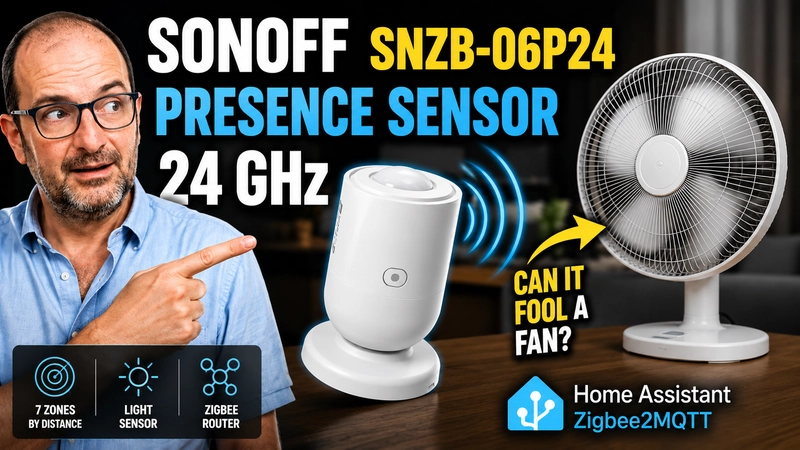
The SONOFF SNZB-06P24 is making waves as a revolutionary Zigbee presence sensor. It uses 24GHz radar to detect not just a person in motion, but also the subtle micro-movements (like breathing) we make when sitting still. On paper, it’s the perfect solution for controlling lights, TVs, or your HVAC system without everything shutting off and leaving you in the dark.
When I decided to write this SONOFF SNZB-06P24 review, I had the same question many of you have when designing smart home automations: can the movement of a simple fan or curtains trick the sensor? To find out, I integrated this device into my Home Assistant server, configured its detection zones, and put it head-to-head against real-world scenarios.
Exclusive Deal for Our Readers: Use coupon code TECNOYFOTOSONOFF to get a 10% discount at the official SONOFF store.
SONOFF sent over the unit used for this review. The purchase link is an affiliate link, which means Tecnoyfoto may earn a small commission at no extra cost to you. This helps support the blog!
What is the SONOFF SNZB-06P24? A Deep Dive into mmWave Tech
Unlike classic PIR detectors, the SONOFF SenseGuard Presence Core SNZB-06P24 integrates an advanced 24GHz mmWave radar. These millimeter waves bounce off objects in the environment and analyze tiny variations, like a heartbeat, the movement of a hand on a PC mouse, or slight shifts in posture on the couch.
This technology is the heart of truly invisible home automation. By keeping the occupancy status active as long as someone is in the room, we can entrust it with the full control of our smart lighting automations, displays, and ceiling fans without having to frantically wave our arms every 5 minutes.
Presence vs. Motion Sensors: The Showdown You Need to Understand
It’s the age-old debate: presence vs. motion sensor. A PIR (Passive Infrared) sensor is cheap, runs on batteries, and is excellent for high-traffic areas (hallways, stairs). However, it “can’t see you” if you’re just sitting still reading a book. This is where mmWave radar changes the game.
| Feature | PIR (Motion) | mmWave (Presence) |
|---|---|---|
| Detects large movements | Yes | Yes |
| Detects a person sitting still | No / Very Poorly | Yes, high precision |
| Power Consumption | Very Low (Battery) | High (Wired USB) |
| Risk of False Positives (fans, etc.) | Low | High (if zones aren’t configured) |
| Recommended Use | Hallways, bathrooms, closets | Living rooms, offices, bedrooms |
Comparison: SNZB-06P24 vs. Aqara FP2 vs. The Old SNZB-06P
To put its value in 2026 into perspective, I’ve prepared this comparison chart against its older sibling and its biggest rival, the Aqara FP2.
| Feature | SONOFF SNZB-06P24 | Old SONOFF SNZB-06PAffiliate link | Aqara FP2 |
|---|---|---|---|
| Radar Technology | 24 GHz | 5.8 GHz | 60 GHz |
| Protocol | Zigbee 3.0 | Zigbee 3.0 | Wi-Fi |
| Detection Zones | 7 distance-based zones (1D) | 1 single global zone | Advanced 2D mapping (up to 30 zones) |
| Person Tracking | 1 primary target | 1 primary target | Up to 5 people simultaneously |
| Light Sensor (Lux) | Yes, calibratable | Basic (Light/Dark) | Yes |
| Approximate Price | Budget-friendly | Discontinued/Clearance | Premium (3x the price) |
As you can see, the SONOFF doesn’t draw a 2D map of your room like the Aqara FP2. Instead, it divides the space into 7 distance-based strips. The trade-off? It’s pure Zigbee (no reliance on your Wi-Fi router) and costs a fraction of the Aqara model’s price.
The Ultimate False Positive Test: Fan vs. Sensor
The biggest challenge for radar sensors is the dreaded presence sensor false positive. Can a fan trick it? Absolutely. The motion of the blades is detected by the millimeter waves just like a person’s chest rising and falling.
For my test, I placed an oscillating fan about 8 feet from the sensor. With all detection zones active, my living room was perpetually marked as “Occupied.” The solution? I simply turned off zones 5, 6, and 7 in the app. Instantly, the sensor ignored the fan (which was now in a blind spot) but continued to detect me on the couch about 5 feet away (zones 1-3 active). It’s a brutally effective calibration tool.
Mini-Guide: Zigbee2MQTT Setup in Home Assistant
If you’re a Home Assistant user, the best way to squeeze every ounce of performance out of this device is with a Zigbee2MQTT (Z2M) setup. To install Zigbee2MQTT, head over to the Apps store (formerly known as Add-ons) in Home Assistant and search for the corresponding repository.
Editor’s Note: For a rock-solid network, I strongly recommend using a good coordinator as I explain in my SMLIGHT SLZB-06 guide and keeping your system up-to-date with our 2026 Zigbee2MQTT installation tutorial.
- Pairing: Press and hold the side button on the sensor for 5 seconds until the LED blinks. Enable “Permit join” in Z2M.
- Exposes Tab: Once detected, navigate to the device’s page in the Zigbee2MQTT interface.
- Zone Adjustment (Radar Scene): You’ll see individual toggles for
Zone 1throughZone 7. Enable only the distances you care about. - Sensitivity: You have Low, Medium, and High levels. I recommend starting with Medium. If it’s picking up your curtains, drop it to Low.
- Fading Time: This is the delay before the sensor state changes to “Clear” after presence is no longer detected. For workspaces, I recommend between 120 and 300 seconds.
If you prefer using the native ZHA integration over Z2M, make sure your installation is up-to-date to ensure you have the latest device “quirks” for full compatibility.
Practical Automation Examples (YAML)
To show you the potential for smart lighting automation, here are a couple of YAML code examples ready to be dropped into your Home Assistant.
1. Smart Office Lighting (Only When It’s Dark)
This automation turns on the light only if you enter, stay, and the room’s brightness is below 50 lux.
alias: "Office: Smart Presence Light On"
description: "Turns on light based on presence if dark"
mode: single
trigger:
  - platform: state
    entity_id: binary_sensor.sonoff_snzb_06p24_occupancy
    to: "on"
condition:
  - condition: numeric_state
    entity_id: sensor.sonoff_snzb_06p24_illuminance_lux
    below: 50
action:
  - service: light.turn_on
    target:
      entity_id: light.office_main_light
    data:
      brightness_pct: 80
2. Fail-Safe TV and AC Shutdown
Ensure the TV and air conditioner turn off only when the room is 100% empty and the fading time has passed.
alias: "Living Room: General Shutdown on Vacancy"
description: "Turns off devices when no one is in the room"
mode: single
trigger:
  - platform: state
    entity_id: binary_sensor.sonoff_snzb_06p24_occupancy
    to: "off"
    for:
      hours: 0
      minutes: 1
      seconds: 0
condition: []
action:
  - service: media_player.turn_off
    target:
      entity_id: media_player.living_room_tv
  - service: climate.turn_off
    target:
      entity_id: climate.living_room_ac
SONOFF SNZB-06P24: The Pros and Cons
After weeks of intensive testing on my home network, here’s my clear-cut verdict:
What I Love (Pros)
- Unbeatable Accuracy for the Price: The 24GHz radar detects micro-movements perfectly without emptying your wallet.
- 7 Configurable Distance Zones: This is a game-changer for isolating motion sources like fans, pets, or windows.
- Integrated Lux Sensor: The light readings are numeric and accurate, perfect for conditional automations.
- Flawless Z2M Integration: Works completely offline, 100% local control.
- Acts as a Zigbee Router: Since it’s plugged in, it strengthens and extends your home’s Zigbee mesh network.
What to Keep in Mind (Cons)
- Requires Constant Power: It’s too power-hungry for batteries. You’ll need a USB port or outlet nearby.
- Linear 1D Mapping: It won’t draw you a 2D map of your furniture (that’s reserved for much pricier premium options).
- Calibration is Mandatory: If you just plug it in without filtering distances, fans or heavy curtains will trigger false positives.
The Verdict: Is It the King of Presence Detection in 2026?
The SONOFF SNZB-06P24 represents the current sweet spot in smart home tech. It’s robust, uses a powerful radar, and provides features that intelligently filter out interference using distance zones. Its price makes it accessible enough to put one in every important room. If you use Home Assistant and are willing to spend 10 minutes calibrating it for your space, it is an absolute must-buy recommendation.
10% Off Coupon Code: TECNOYFOTOSONOFF
Frequently Asked Questions (FAQ)
Do I need a hub to use it?
Yes. As a Zigbee 3.0 device, you need a Zigbee coordinator (like a USB dongle or a brand’s hub) and your smart home software, whether that’s the SONOFF bridge, Home Assistant, or a similar platform.
Can it detect my dog or cat?
Yes. The radar’s high sensitivity will detect your pet if it walks through the coverage area. If your pet sleeps on the floor, I suggest adjusting the angle of the sensor’s magnetic mount to point slightly upwards, creating a blind spot at floor level.
Can it turn on lights at night without waking my partner?
The radar itself can’t distinguish between people. However, by combining the presence sensor’s state with the lux readings from the same device in Home Assistant, you can create automations that turn on a light to just 10% brightness, but only if it’s the middle of the night and presence is detected.
Continue reading
Next related guide · 10 min read
The Ultimate Zigbee2MQTT Home Assistant Guide for 2026
If you want a flexible, local, and well-supported Zigbee setup in Home Assistant, Zigbee2MQTT is one of the strongest options available in 2026. It…
Continue with this article