
As an Amazon Associate, I earn from qualifying purchases. En calidad de Afiliado de Amazon, obtengo ingresos por las compras adscritas que cumplen los requisitos aplicables. If you buy through these links, the price is the same for you and Amazon pays me a small commission that helps keep Tecnoyfoto running.

Updated on January 21, 2026
Tapo C200 Review 2026: Still the Reigning Champ of Budget 360° Security?
Even years after its debut, the TP-Link Tapo C200Affiliate link remains a benchmark in the budget-friendly 360° security camera space in 2026. Its formula is simple yet brutally effective: deliver core features like pan/tilt movement, decent Full HD video quality, and a ridiculously easy setup, all at a price that’s still tough to beat. For this Tapo C200Affiliate link review for 2026, I dusted off this old classic to see if it can still hang with modern alternatives and determine who should still consider it the perfect buy.
Tapo C200 Video Review
Quick Look: Tapo C200 Pros and Cons
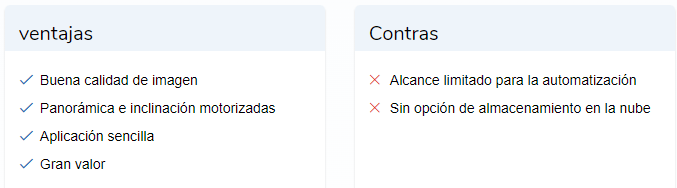
✅ Pros
- Unbeatable Price: It’s still one of the cheapest motorized cameras you can find.
- User-Friendly: Setup and daily use through the Tapo app are dead simple.
- Solid Image Quality: Its 1080p sensor delivers crisp video for day and night home monitoring.
- Free Local Storage: Records to a microSD card, letting you dodge mandatory subscriptions.
- 360° Pan/Tilt: Full room coverage thanks to its motorized base.
❌ Cons
- No Free Cloud: Cloud storage is locked behind a Tapo Care subscription.
- Basic Resolution for 2026: 1080p feels dated compared to new 2K and 4K standards.
- Limited AI without Subscription: Advanced AI features (person, pet detection) require Tapo Care.
- Not Kasa App Compatible: Forces you into the separate Tapo ecosystem.
Key Tech Specs (2026 Update)
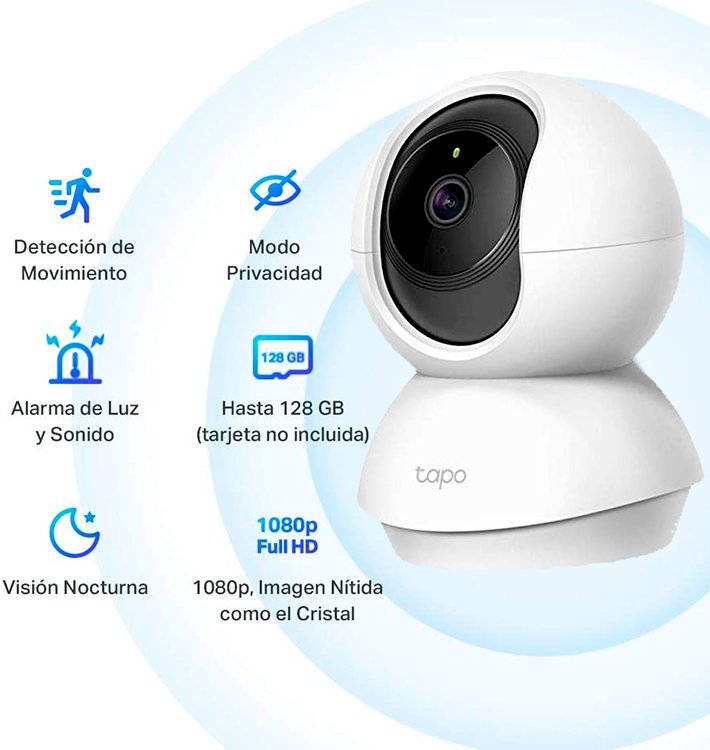
- Price (2026): Around $25-35 (Check current price on AmazonAffiliate link)
- Type: Motorized Indoor Security Camera
- Dimensions: 4.6 x 3.4 x 3.3 inches (118 x 87 x 85 mm)
- Resolution: Full HD 1080p
- Motion: 360-degree horizontal pan / 114-degree vertical tilt
- Storage: Up to 256GB microSD card (not included) or Tapo Care cloud subscription.
- Night Vision: IR with a range of up to 30 ft (approx. 9 meters).
- Connectivity: 2.4 GHz Wi-Fi
- Audio: Two-way (built-in microphone and speaker)
- Compatibility: Amazon Alexa and Google Assistant
- Advanced Protocols: Supports ONVIF and RTSP for integration with surveillance systems and home automation platforms like Home Assistant.
Design and Features: An Old-School Classic That Just Works
The TP-Link Tapo C200Affiliate link isn’t going to win any design awards in 2026, but its spherical camera on a rotating base is functional and discreet. The key here is flexibility: you can place it on any flat surface or use the included mounting bracket to attach it to the ceiling and flip the image in the app.
The Tapo C200 setup process is still the gold standard for simplicity. You plug it in, wait for the LED to blink, open the Tapo app (for Android and iOS), and follow a few simple prompts. The app finds the camera instantly, you tell it your Wi-Fi password, and it’s online in under two minutes. Voice prompts from the camera itself guide you through the whole thing.
The Tapo App in 2026: Mature and Capable
The Tapo app has evolved nicely over the years. The main screen gives you a live view of all your cameras. Tapping into the C200, the controls are intuitive: a virtual joystick to move the lens, buttons for two-way talk, activating the siren, or snapping a photo. You can also set preset positions to point the camera at key spots (the front door, a window, the baby’s crib) with a single tap.
Playing back recordings from the microSD card is straightforward, with a timeline that highlights detected motion events, making it easy to find specific moments.
Motion Detection and Local Storage
The C200 uses basic motion detection to send alerts to your phone and trigger recordings. To cut down on false alarms (like a curtain blowing in the wind), you can set up “Activity Zones” and adjust sensitivity. Quick tip: if you pan or tilt the camera, remember the activity zone moves with it, so it’s best for a fixed monitoring position.
Its killer feature against many modern competitors is still local storage. With a microSD card, you aren’t reliant on an internet connection to record, and more importantly, you don’t have to pay a monthly fee. Sure, if a thief steals the camera, the footage is gone, but for everyday monitoring (checking on pets, keeping an eye on the kids), it’s a perfect, private solution.
Tapo Care: The Cloud Subscription Service
For those who want an extra layer of security, TP-Link offers Tapo Care. This optional subscription service adds key features that transform the experience:
- Cloud Storage: Saves a 30-day recording history to TP-Link’s servers, ensuring your videos are safe even if the camera is stolen or damaged.
- AI Detection: The camera gets smarter, able to differentiate between people, pets, and even detect a baby’s cry, sending you much more relevant notifications.
- Rich Notifications: You get a snapshot thumbnail right in the notification, so you can see what happened without even opening the app.
Tapo Care plans in 2026 typically have a monthly or annual cost per device, with discounts if you subscribe for multiple cameras, making it a worthy upgrade if you need those advanced features.
Image Quality: 1080p That Punches Above Its Weight
For a camera in this price bracket, the image quality is surprisingly good. The “HQ” (High Quality) mode delivers a crisp Full HD 1080p video feed, with decent exposure handling in scenes with bright and dark areas. At night, the infrared night vision effectively illuminates an average-sized room, letting you see clearly in total darkness.
While it’s true that 2K and 4K cameras offer far more detail in 2026, for most indoor security use cases, the Tapo C200’s resolution is more than enough to identify faces and see what’s going on.
Tapo C200 vs. The Competition: 2026 Showdown
The budget camera market is more crowded than ever. Here’s how the Tapo C200 stacks up against two of its biggest rivals in 2026.
| Feature | TP-Link Tapo C200 | Xiaomi Smart Camera C300 | EZVIZ C6N |
|---|---|---|---|
| Resolution | Full HD (1080p) | Super HD (2K / 1296p) | Full HD (1080p) |
| Storage | microSD / Cloud (Tapo Care) | microSD / Cloud / NAS | microSD / Cloud (CloudPlay) |
| AI Features (No Sub) | Motion Detection | Person Detection | Motion Detection |
| Smart Integration | Alexa, Google Assistant, RTSP/ONVIF | Alexa, Google Assistant | Alexa, Google Assistant |
| Estimated Price (2026) | ~$25-35 | ~$35-45 | ~$30-40 |
Frequently Asked Questions (FAQ) about the Tapo C200
Do I need a Tapo Care subscription to use the camera?
Nope. The camera is 100% functional without a subscription. You can live stream, get motion alerts, and record to a microSD card without paying a dime.
What kind of microSD card do I need?
You’ll need a Class 10 microSD card, up to 256 GB. A 128 GB card can hold several weeks’ worth of motion-activated recordings.
Does the Tapo C200 record continuously?
Yes, in the app settings, you can choose to have it record 24/7 or only when it detects motion, whatever works best for you.
Does it work if the internet goes out?
If you have a microSD card installed, the camera will continue to record motion events even if it loses its internet connection. However, you won’t be able to live view or receive notifications until the connection is restored.
Final Verdict: Should You Buy the Tapo C200 in 2026?
After putting it through its paces again, my final take on the Tapo C200 in 2026 is a clear and resounding *yes*—but for a specific type of user. If you’re looking for your first security camera, need to monitor a second home, check in on your pets, or just want a cheap and reliable solution that doesn’t force you into a monthly plan, the C200 is still an unbeatable value.
Its blend of price, ease of use, decent video quality, and the all-important local storage option make it a smart, safe buy. The lack of free cloud recording might be a deal-breaker for some, but for others, it’s a privacy win. If you’re chasing higher resolution or more advanced on-board AI without opening your wallet for a subscription, then you’ll want to check out the alternatives. For everyone else, this old workhorse proves that a good design can stand the test of time.
If you want to explore other options, check out our updated guide to the best indoor security cameras.
Continue reading

Next related guide · 6 min read
Asus ZenWiFi AX (XT8) Review 2026: Is This WiFi 6 Legend Still Worth It?
Updated January 30, 2026 Asus ZenWiFi AX (XT8) Review 2026: Is This WiFi 6 Legend Still Worth It? When it first launched, the Asus…
Continue with this article