
As an Amazon Associate, I earn from qualifying purchases. En calidad de Afiliado de Amazon, obtengo ingresos por las compras adscritas que cumplen los requisitos aplicables. If you buy through these links, the price is the same for you and Amazon pays me a small commission that helps keep Tecnoyfoto running.

Updated on February 6, 2026
In 2026, Alexa compatible cameras have become a cornerstone of smart security and home automation. Gone are the days of complex, overpriced surveillance systems. Today, thanks to seamless Alexa integration, you can have complete control over your home’s security with simple voice commands. Whether you’re checking in on your pets from the office, making sure the kids are doing their homework, or just seeing who’s at the front door, these cameras offer powerful and accessible remote monitoring. You can ask your Echo Show or Fire TV, “Alexa, show me the backyard camera,” and get a live feed instantly. Plus, their connection with Alexa Routines lets you build advanced automations, like turning on the porch lights when motion is detected. They are the perfect addition to any Alexa-enabled security system.
Key Features to Look for in an Alexa Security Camera in 2026
The market has evolved dramatically. Before you pull the trigger on a purchase, it’s crucial to understand the tech that defines a great camera in 2026:
- 2K & 4K Resolution: Let’s be clear: 1080p is officially obsolete. The bare minimum standard today is 2K (1440p) for crisp, clear details. High-end models now offer 4K (2160p), allowing you to digitally zoom without losing the critical image quality needed to identify faces or license plates.
- On-Device Artificial Intelligence (AI): Generic motion detection just doesn’t cut it anymore. Modern cameras process footage locally (on the device itself) to distinguish between people, vehicles, pets, and packages. This drastically reduces false alarms and enhances your privacy, as less data needs to be sent to the cloud.
- Dual Storage Options: Look for models that offer both a cloud subscription and local storage via a microSD card or even a connection to a NAS. This gives you flexibility and complete ownership of your recordings.
- Wi-Fi 6 Connectivity: To stream high-resolution video without buffering, a stable connection is non-negotiable. Wi-Fi 6 compatible cameras are better at managing congested networks, a common issue in today’s smart homes.
- Privacy & Security: In 2026, your data security is paramount. Ensure the camera offers end-to-end encryption (E2EE), two-factor authentication (2FA), and is made by a brand transparent about its security practices.
- Matter Compatibility: While our focus is on Alexa integration, the Matter standard ensures your camera can communicate with other ecosystems like Google Home or Apple HomeKit. This future-proofs your investment. If you want to learn more, I explain what Matter is all about here.
Comparison Chart: The Best Alexa Compatible Cameras of 2026
To make your decision easier, I’ve put together this chart with the models that, in my opinion, offer the best performance and features on the market right now.
| Model | Best For | Resolution | AI Detection | Storage | Price Range |
|---|---|---|---|---|---|
| eufy Indoor Cam S350 | Indoor Static (Dual-Lens) | 4K | People, Pets, Crying | Local (microSD) / Cloud | $99 – $129 |
| TP-Link Tapo C230 | Indoor 360° (Pan & Tilt) | 4K | People, Pets, Sounds | Local (microSD) / Cloud | $59 – $79 |
| Arlo Pro 6 UltraAffiliate link | Outdoor Wire-Free (Battery) | 4K HDR | People, Vehicles, Packages | Cloud (Subscription Required) | $249 – $299 |
| Reolink Duo 3 PoEAffiliate link | Outdoor Fixed (180° Panoramic) | 16 MP (Ultra HD) | People, Vehicles, Pets | Local (microSD/NVR) / Cloud | $199 – $249 |
| Aqara Camera Hub G4 | Indoor Static + Zigbee Hub | 2K | People, Faces, Gestures | Local (microSD) / Cloud | $109 – $139 |
In-Depth Reviews of Our Recommended Cameras
Best Indoor Alexa Compatible Cameras
eufy Indoor Cam S350 (Dual-Lens)Affiliate link
Eufy really knocked it out of the park with this dual-lens camera. It combines a telephoto lens for 3X lossless optical zoom with a 4K wide-angle lens. Its on-device AI is excellent for tracking people or pets around the room, and the Alexa integration is flawless. This is the perfect model for monitoring large rooms with an incredible level of detail.
- Dual 4K + 2K Lens: Capture the whole scene and zoom in on details with stunning clarity.
- 8X Hybrid Zoom: A powerful combination of optical and digital zoom means you won’t miss a thing.
- AI Tracking & 360° Pan/Tilt: The camera automatically follows any detected motion.
- No Mandatory Monthly Fees: Its biggest selling point is local storage, though a cloud option is available if you want it.
 Affiliate link
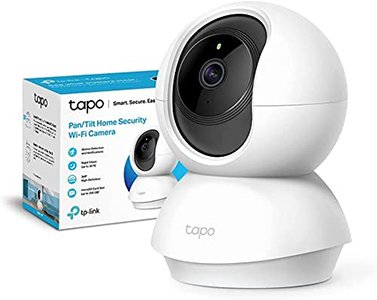
TP-Link Tapo C230 (4K Pan & Tilt)Affiliate link
TP-Link’s Tapo line continues to be the king of the bang-for-your-buck category in 2026. The C230 model upgrades the popular C210 to a crisp 4K resolution, improves color night vision with its Starlight sensor, and keeps its reliable pan-and-tilt motor. You can control its movement with your voice via Alexa or set up automatic patrols. It’s hands-down the best budget option for complete room coverage.
- 4K Ultra HD Video: Captures every detail with crystal-clear definition.
- Color Night Vision: Thanks to its advanced sensor, it can display full-color images in low-light conditions.
- 360° Coverage: Its horizontal and vertical movement eliminates blind spots.
- AI Detection & Notifications: Intelligently alerts you when it detects people or specific sounds.
 Affiliate link
Best Outdoor Alexa Compatible Cameras
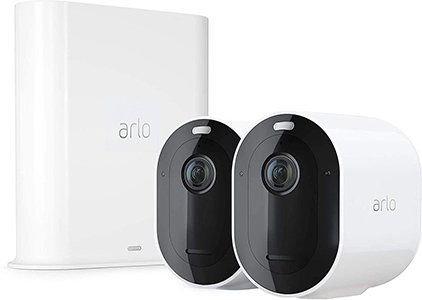
Arlo Pro 6 UltraAffiliate link
Arlo remains the benchmark for high-end, battery-powered outdoor cameras. The Pro 6 Ultra delivers stunning 4K HDR video quality that perfectly balances bright and dark areas. Its 180-degree field of view and integrated spotlight will deter any intruder. While its ecosystem truly shines with a paid subscription, the build quality, reliability, and top-tier Alexa integration are worth the investment.
- 4K Video with HDR: Cinematic image quality, day or night.
- 180° Field of View: Ultra-wide coverage without distortion.
- Integrated Spotlight & Siren: Active deterrence that you can control remotely or automate.
- Wire-Free Installation: Its long-lasting battery makes it easy to place anywhere.
 Affiliate link
Reolink Duo 3 PoEAffiliate link
If you’re looking for uncompromising outdoor coverage and can run an Ethernet cable, the Reolink Duo 3 PoEAffiliate link is an absolute beast. It uses two lenses to stitch together a seamless 180° panoramic image at a staggering 16MP resolution, eliminating fisheye distortion. Power over Ethernet (PoE) ensures an ultra-stable connection and power supply. Its person and vehicle detection is one of the most reliable I’ve tested, and its Alexa integration is straightforward. For even more control, you can integrate it locally into systems like Home Assistant.
- 16MP Ultra HD Resolution: An unprecedented level of detail in the consumer market.
- 180° Panoramic View: Complete coverage of your home’s exterior or backyard with a single camera.
- Power over Ethernet (PoE): Maximum reliability with a single cable for both data and power.
- Advanced AI Detection: Accurately filters motion events to prevent false alarms.
- IP67 Certified: Built to withstand the harshest weather conditions, from heavy rain to dust storms.
 Affiliate link
Installation and Smart Home Integration
How Do You Install a Security Camera in 2026?
Installation is easier than ever, but proper planning is still key:
- Strategic Placement: Before you drill any holes, plan your locations. For outdoor cameras, aim for a high vantage point, sheltered from direct rain and out of easy reach for intruders. For indoor cameras, corners usually offer the best coverage.
- Check Your WiFi Signal: Use an app on your phone to measure the WiFi signal strength at the exact spot you plan to install the camera. A weak signal is the number one cause of performance issues.
- Power Source: If the camera isn’t battery-powered, make sure you have an outlet nearby. For outdoor installs, consider using an outdoor-rated extension cord or hiring an electrician for a safe, permanent solution.
- Initial Setup: Always follow the manufacturer’s app instructions. The initial configuration is done through their dedicated app, not the Alexa app.
How to Connect Your Camera to Alexa
The process is nearly universal for almost all devices and hasn’t changed much:
- Install and set up the camera using the official manufacturer’s app (e.g., Eufy Security, TP-Link Tapo, Arlo Secure). Make sure you can view the live feed in that app first.
- Open the Alexa app on your smartphone.
- Navigate to “More” > “Skills & Games.”
- Search for your camera manufacturer’s Skill (e.g., “eufy Security”) and enable it.
- Alexa will prompt you to log in with the account you created in step 1. This links the two platforms.
- Once linked, Alexa will discover new devices. Your camera should appear automatically. That’s it! You can now say, “Alexa, show me the [camera name].”
Advanced Integration with Home Assistant
For smart home enthusiasts seeking maximum control and privacy, many of these cameras can be integrated into Home Assistant. Models from Reolink and some from Tapo offer a video stream via the RTSP protocol. This allows you to manage your cameras 100% locally, without relying on the manufacturer’s cloud, and create far more complex automations. If you use Zigbee, models like the Aqara Camera Hub G4 act as a bridge, letting you connect sensors directly to it.