
As an Amazon Associate, I earn from qualifying purchases. En calidad de Afiliado de Amazon, obtengo ingresos por las compras adscritas que cumplen los requisitos aplicables. If you buy through these links, the price is the same for you and Amazon pays me a small commission that helps keep Tecnoyfoto running.

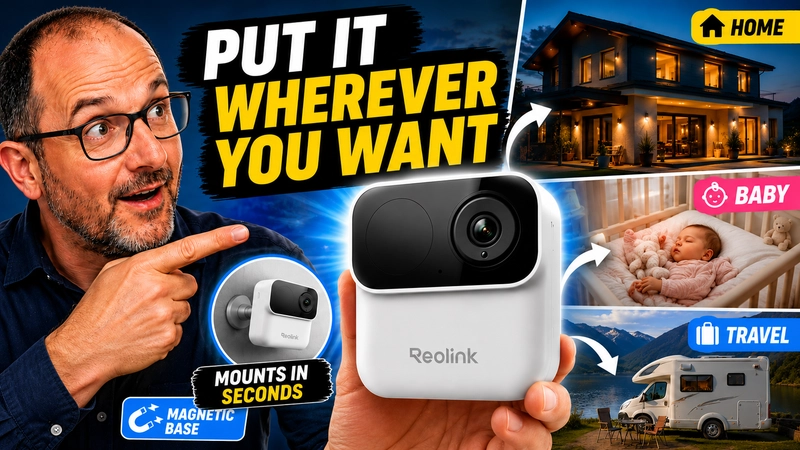
The Reolink Argus MagiCam is a rather unique security camera within Reolink’s catalog. It does not try to compete by offering the highest resolution, nor by being the most professional camera, nor by offering advanced continuous recording features while running on battery. Its proposal goes in a different direction: to be a small, portable, wire-free camera with a magnetic mount, designed to be placed quickly in places where a traditional camera would be more inconvenient.
And that is exactly where its charm is.
This is not a camera meant to replace a fixed PoE system, nor is it a 4G camera for placing on a property with no internet. The Argus MagiCam is a 2-megapixel WiFi camera powered by AA lithium batteries or USB-C power, with smart detection, local microSD storage, and compatibility with Reolink Home Hub. Reolink presents it as a low-power magnetic camera, with up to 9 months of claimed battery life and indoor/outdoor use thanks to its IP67 protection.
What Exactly Is the Reolink Argus MagiCam?
The Argus MagiCam is a compact, wire-free WiFi security camera. Its main selling point is not resolution, but ease of installation.
It has a small design, can be placed on its magnetic base, and can also be attached to metal surfaces without drilling. This makes it an interesting camera for temporary use: a room, an entrance, an RV, a construction site, a second home, a hallway, or even occasional baby monitoring, always with common sense and without confusing it with a medical baby monitor.
Reolink itself positions it as a flexible camera for indoor and outdoor use, with magnetic mounting, an adjustable bracket, and IP67 resistance against dust and water.
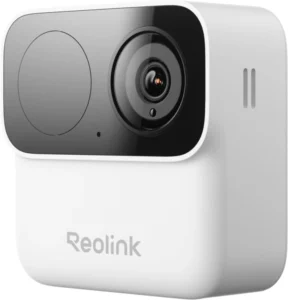
Main Specifications of the Reolink Argus MagiCam
| Feature | Reolink Argus MagiCam |
|---|---|
| Resolution | 1920 x 1080 pixels, 2 MP |
| Sensor | 1/3.2” CMOS |
| Frame rate | 15 fps on battery, up to 20 fps when powered |
| Lens | 2.3 mm, F2.2 |
| Field of view | 132° diagonal, 113.3° horizontal, 62.7° vertical |
| Night vision | 850 nm infrared |
| Audio | Built-in microphone and speaker |
| Power | AA lithium batteries or 5V/1A via USB-C |
| Claimed battery life | Up to 9 months |
| WiFi | 2.4 GHz and 5 GHz |
| Local storage | microSD up to 256 GB |
| Detection | PIR, motion, person, vehicle and animal |
| PIR range | Up to 10 meters |
| PIR angle | 120° horizontal |
| Weather resistance | IP67 |
| Dimensions | Ø68 x 68 x 28.86 mm |
| Weight | 108 g without battery |
| Smart home compatibility | Google Assistant and Alexa |
| Home Assistant | Through Reolink Home Hub / Home Hub Pro / Home Hub Mini |
Magnetic Design: This Is Its Biggest Advantage
The most interesting thing about this camera is not that it records in Full HD. Nowadays, that does not surprise anyone. What is truly useful is its design.
The Argus MagiCam can be placed very quickly, with no cables, no drilling, and no complex installation. This changes the kind of use we can give it quite a bit. Installing an outdoor camera with screws, power, a mount, and prior planning is not the same as placing a camera on a shelf, a metal railing, a corner of an RV, or a specific area for a few days.
This is where the camera makes the most sense.
For example, it can work very well for:
- Temporarily monitoring an entrance.
- Having a camera in a hotel room or vacation rental.
- Using it in an RV.
- Placing it on a construction site or during a renovation to monitor a specific area.
- Monitoring a second home when WiFi is already available.
- Using it as a temporary camera in a garden area.
- Supervising a room, a baby, or a pet, always without relying on it for critical situations.
This is not a camera designed to be installed and forgotten for years. It is more of an “I’ll put it here because I need it here today” camera.
Image Quality: Decent Full HD, but Do Not Expect 4K
The Argus MagiCam records at 1920 x 1080 pixels. In other words, 2-megapixel Full HD. To identify a presence, see what is happening, receive alerts, and review events, it can be enough. But let’s be clear: this is not a camera for those looking for maximum detail, license plates at a distance, or a spectacular image.
On battery power, it works at 15 fps, and when connected to power it can reach up to 20 fps. Compression is H.264 and the bitrate comes limited from the factory. This makes sense because the goal of this camera is to consume little power and extend battery life, not to offer the highest possible video quality.
If we want higher resolution, better color night vision, a wider field of view, or a more advanced experience, within Reolink’s own catalog it would make more sense to look at models like the Argus 4 Pro. That camera plays in a different league: dual lens, 4K, 180° panoramic view, ColorX, and WiFi 6. But it is also a different type of product: larger, more expensive, and less “grab-and-go” than the MagiCam.
Night Vision
The Argus MagiCam uses infrared night vision, not ColorX-style color night vision. This matters because these concepts are often mixed up.
With infrared, we will be able to see in the dark, but the image will be black and white. For basic surveillance, that is enough, but do not expect the most impressive night image in Reolink’s catalog.
This also helps explain why the Argus 4 Pro and Reolink’s ColorX cameras exist. The MagiCam focuses on portability and low power consumption; other models focus on better image quality.
Battery Life: Up to 9 Months, but With Realistic Fine Print
Reolink talks about up to 9 months of battery life with AA lithium batteries, thanks to a low-power WiFi solution from Qualcomm. On paper, that is a very attractive figure, but it is important to interpret it correctly.
Real battery life will depend heavily on:
- How many detections it gets per day.
- How often we open the live view.
- The quality of the WiFi signal.
- Ambient temperature.
- The length of recordings.
- Whether it is placed in an area with a lot of movement.
- Whether we use it indoors or outdoors.
These types of cameras are not designed to stream video all day from battery power. If you place it facing a very busy street, or if you constantly open the live view from the app, battery life will drop.
To take advantage of those months of battery life, you need to use it for what it is: a low-power camera that wakes up when it detects motion or when the user opens the live view.
24/7 Recording: Only With External Power
This point is key.
The Reolink Argus MagiCam can do continuous 24/7 recording, but not when running only on batteries. To record 24 hours a day, 7 days a week, it needs to be connected to a DC power source through USB-C. Reolink clearly states in its product page that continuous 24/7 recording is available when the camera is connected to power.
This makes perfect sense. A battery-powered camera cannot record continuously for months. If someone wants permanent recording, the right approach is to power it by cable or choose another type of camera.
Storage: microSD, Home Hub, and No Mandatory Subscription
One of Reolink’s strengths compared to many home camera solutions is that it does not force you to depend on a subscription to store recordings.
The Argus MagiCam supports microSD cards up to 256 GB. This allows events to be stored locally on the camera itself. It is also compatible with the Reolink Home Hub family, including Home Hub, Home Hub Pro, and Home Hub Mini.
The microSD option is convenient and inexpensive, but it has one obvious disadvantage: if someone takes the camera, they can also take the recordings. For more serious use, the Home Hub makes more sense because it centralizes storage inside the home.
The Reolink Home Hub allows you to manage multiple cameras, offers encrypted local storage, does not require monthly fees, and is designed as a management center for Reolink cameras. According to the official product page, the Home Hub supports up to 8 cameras and microSD storage of up to 1 TB x 2.
It Is Not a 4G Camera
This needs to be very clear: the Reolink Argus MagiCam is not a 4G or 5G camera.
It is a WiFi camera. It works on 2.4 GHz and 5 GHz networks, but it needs a WiFi network to connect to the internet or to the local network.
So, can it be used away from home? Yes, but with some nuance.
For example, in an RV, at a campsite, on a construction site, or in a second home, we could use it with a portable 4G router with a SIM card, such as a TP-Link M7350 or a similar device. In that case, the camera does not connect directly to the mobile network: it connects to the WiFi created by the 4G router.
In other words:
The router gets internet from the mobile network and creates a WiFi network.
The Reolink Argus MagiCam connects to that WiFi network.
From the Reolink app, we can view the camera, receive alerts, and review recordings.
But technically, the camera is still not 4G.
Reolink App: The Main Control Center
The camera is managed from the Reolink app. From there, we can view the live feed, review recordings, configure detection settings, receive notifications, modify settings, and manage storage.
It also has two-way audio, so we can listen to what is happening near the camera and talk through the built-in speaker. This can be useful for an entrance, an RV, a pet, or a specific area where we want to interact.
Smart Detection
The Argus MagiCam includes PIR detection, motion detection, and smart detection for people, vehicles, and animals. The PIR sensor has a claimed range of up to 10 meters and a horizontal angle of 120°.
Here, expectations need to be realistic. In battery-powered cameras, PIR detection is very important because it helps wake the camera only when necessary. This improves battery life, but it also means the camera is not constantly analyzing video the way a powered camera would.
For most home or temporary uses, it makes sense. For critical or professional surveillance, it is better to look at wired cameras, PoE models, or systems with continuous recording.
Home Assistant Integration: A Reolink Home Hub Is Essential
This is one of the most important points for Tecnoyfoto users.
If you want to integrate the Reolink Argus MagiCam with Home Assistant, you need a Reolink hub. This is not a camera you should treat like a traditional IP camera that you simply add directly by IP and forget about.
The official Reolink integration in Home Assistant explains that Reolink battery-powered cameras can be used with Home Assistant with the help of a Reolink Home Hub or an NVR. That hub acts as a bridge between the battery-powered cameras and Home Assistant, while also helping preserve battery life.
In addition, Reolink’s own Home Hub compatibility list includes the Argus MagiCam as a factory-supported camera, with no firmware update required.
So, if your goal is to integrate it with Home Assistant, the correct idea would be:
Reolink Argus MagiCam → Reolink Home Hub → Home Assistant
I would not buy this camera with Home Assistant in mind if you do not plan to use a Reolink hub.
There is also another important detail: in Home Assistant, it is not a good idea to leave the live feed from a battery-powered camera always visible on a wall panel, because that keeps the camera awake and drains the battery. Home Assistant’s documentation specifically warns that viewing the stream keeps battery-powered cameras awake.
Quick Comparison: Reolink Argus MagiCam vs Argus 4 Pro
| Feature | Argus MagiCam | Argus 4 Pro |
|---|---|---|
| Focus | Portability and magnetic mounting | Better image quality and wider coverage |
| Resolution | 2 MP / 1080p | 8 MP / 4K panoramic |
| Field of view | 113.3° horizontal | 180° horizontal |
| Night vision | Infrared | ColorX / color night vision |
| Battery | AA lithium batteries | 5000 mAh rechargeable battery |
| Solar | Not its main selling point | Compatible with solar panel |
| microSD | Up to 256 GB | Up to 512 GB |
| WiFi | 2.4/5 GHz | WiFi 6, 2.4/5 GHz |
| Installation | Very quick and magnetic | More focused on fixed installation |
| Best for | Temporary use, portability, specific areas | Outdoor use, garden, entrance, more serious surveillance |
The Argus MagiCam does not directly compete with the Argus 4 Pro. The first one focuses on convenience and portability. The second one focuses on better image quality, a wider field of view, and a more powerful experience.
The Best Things About the Reolink Argus MagiCam
The most positive thing about this camera is its flexibility. It is small, quick to place, does not require wiring, runs on AA lithium batteries, and solves situations where a fixed camera would be more cumbersome to install.
I also like that it keeps Reolink’s philosophy: local storage, no mandatory monthly fee, a fairly complete app, and the possibility of integrating it into the Reolink Home Hub ecosystem.
Another strength is that it is not limited to 2.4 GHz only. Having both 2.4 and 5 GHz WiFi helps it adapt better depending on the environment. The 2.4 GHz band may be better for distance and walls; the 5 GHz band may work better if we are close to the router and want a faster connection.
The Worst Things About the Reolink Argus MagiCam
The first thing is that it is not 4G. And this needs to be repeated because it can lead to confusion. To use it away from home, it needs a WiFi network, whether from a house, a 4G router, an RV, or an access point.
The second thing is resolution. Full HD may be enough for many situations, but this is not a camera for those looking for maximum detail.
The third thing is that 24/7 recording only makes sense when connected to power. On batteries, its natural use is event-based recording.
And the fourth thing is Home Assistant: if you want to integrate it properly, you need a Reolink Home Hub or a compatible device. I would not buy it expecting to add it directly to Home Assistant like a classic IP camera.
Who This Camera Makes Sense For
The Reolink Argus MagiCam makes sense for anyone who wants a camera that is easy to move, easy to place, and does not require a complicated installation.
I find it especially interesting for:
- People who want a temporary camera.
- Users who want to monitor a specific area without installing anything permanently.
- RVs or temporary stays with WiFi.
- Rooms, entrances, terraces, or indoor areas.
- Construction sites or home renovations.
- Users who already have Reolink cameras and want to expand their system.
- Home Assistant users who are also willing to use Reolink Home Hub.
I do not find it as suitable for:
- Professional surveillance.
- 24/7 recording without external power.
- Places without WiFi.
- Users who want 4K.
- People who want to integrate it directly into Home Assistant without a hub.
- Areas where the camera could be stolen easily if it only records to microSD.
Where to Buy the Reolink Argus MagiCam With a Discount
If you are interested in this camera, you can buy it from the official Reolink store or from Amazon.
Reolink Argus MagiCam in the official store:
https://reolink.com/es/product/argus-magicam/?aff=1006
Reolink Store on Amazon:
https://amzn.to/4uwbs8aAffiliate link
In addition, Reolink has provided us with a discount coupon for the Tecnoyfoto community:
Coupon: Tecnoyfoto5
Discount: 5%
Conclusion: A Very Practical Camera if You Understand Its Limits
The Reolink Argus MagiCam is not Reolink’s most powerful camera, nor is it trying to be. Its value lies somewhere else: it is small, magnetic, runs on AA lithium batteries, can be placed in many different spots, and does not force you to pay for a subscription to store recordings.
As a portable or temporary camera, I think it is a very interesting proposal. For a room, an RV, an entrance, a construction site, a second home with WiFi, or an area you want to monitor for a few days, it makes quite a lot of sense.
But you need to buy it knowing what it is.
It is not 4G.
It is not 4K.
It is not designed for 24/7 recording on batteries.
And if you want to integrate it with Home Assistant, you need to do it through a Reolink Home Hub or a compatible system.
If you accept those limits, the Reolink Argus MagiCam may become one of those cameras you end up using more than expected precisely because it does not force you into a fixed installation. You place it where you need it, move it when necessary, and integrate it into the Reolink ecosystem.
For me, that is its real charm.
FAQ
Is the Reolink Argus MagiCam a 4G Camera?
No. The Reolink Argus MagiCam is a WiFi camera. It can connect to 2.4 GHz and 5 GHz networks, but it does not have a SIM card or its own 4G/5G connection.
Can It Be Used in an RV?
Yes, as long as a WiFi network is available. For example, it can be used together with a portable 4G router with a SIM card, but the camera will connect to the router’s WiFi, not directly to the mobile network.
Does It Record 24/7?
Yes, but only when it is connected to external power. On batteries, its logical use is event-based recording.
Does It Have a microSD Card Slot?
Yes. It supports microSD cards up to 256 GB.
Does It Work With Home Assistant?
Yes, but through Reolink Home Hub, Home Hub Pro, Home Hub Mini, or a compatible NVR. For Home Assistant, you should not treat it like a traditional IP camera connected directly.
Does It Have Color Night Vision?
No. It uses infrared night vision.
Does It Have Person Detection?
Yes. It includes PIR detection, motion detection, and detection of people, vehicles, and animals.
Is It Worth It?
It is worth it if you are looking for a portable, magnetic, simple, wire-free camera for temporary use or specific areas. It is not the best option if you are looking for 4K, continuous battery-powered recording, or a professional installation.
Continue reading

Next related guide · 2 min read
Alexa Plus with AI in Spain: Is the New Assistant Worth It?
The arrival of Alexa Plus with artificial intelligence has been official in Spain since July 23, 2026. After months of speculation, Amazon has begun…
Continue with this article