
Last updated: January 24, 2026
Here in 2026, finding the best Google Home security system has gone from a tech scavenger hunt to a key strategic decision for any smart home. Thanks to the maturity of the Internet of Things (IoT) and the rise of universal standards like Matter, home security and automation no longer just coexist—they supercharge each other. As an IoT Engineer, I’ve had a front-row seat to this evolution. In this definitive guide, I’ll walk you through the top-tier options to protect your home using the power of your voice.
How to Pick the Best Google Home Security System in 2026
Before we jump into specific models, it’s crucial to understand what defines the best smart security system in 2026 for your unique needs. The right choice hinges on your budget, tech-savviness, and the level of security you’re aiming for.
- DIY (No Monthly Fee) vs. Professional Monitoring: No-fee, or DIY, systems put you in complete control, sending alerts directly to your smartphone. They’re affordable and flexible. Professionally monitored systems offer 24/7 support from a central station that can dispatch police, all for a monthly subscription.
- Direct Connection vs. Hubs: Some systems connect directly to Google Home over Wi-Fi. Others, especially those using protocols like Zigbee, require a dedicated hub or bridge. If you’re a power user with a system like Home Assistant, your options expand exponentially, allowing you to integrate virtually any device.
- Connectivity Protocols: Wi-Fi is straightforward but can congest your network. Zigbee is a robust, low-power protocol that creates a stable mesh network, but it needs a hub. Matter compatibility, the universal smart home standard, is a game-changer in 2026, drastically simplifying setup between different brands and making it a key factor to look for.
- Starter Kit Components: Check what’s included in the box. Will you need more door/window sensors, pet-immune motion detectors, or a loud outdoor siren? Plan ahead.
The Best No-Monthly-Fee Google Home Security Systems
If you prefer a self-managed solution, these are the systems I’ve personally tested and recommend for their reliability, ecosystem, and stellar integration with Google Assistant. The old generic RFID alarms are a thing of the past; today’s market is dominated by trusted brands.
Aqara Home Alarm System

Aqara has become a benchmark for smart home enthusiasts, thanks to its incredibly stable, low-power Zigbee ecosystem. Its alarm system, built around its Hubs (like the M2 or the newer M3 with Matter support), integrates natively and seamlessly with Google Home. You can arm the alarm with Google Home in its different modes (Away, Home, Night) and use its sensors to trigger endless automations.
What I value most about Aqara is the versatility of its components. A door and window sensor isn’t just for security; it can also turn on lights when you enter a room or adjust your thermostat. Its deep compatibility with Home Assistant is another major plus for advanced users.
Eufy Security Alarm Kit

Eufy’s (by Anker) value proposition has always been crystal clear: security with no mandatory monthly fees and local storage. Their alarm system follows this philosophy to a T. The HomeBase acts as the central hub and siren, communicating wirelessly with all the sensors. The Google Home integration lets you arm and disarm the system with your voice and check the status of any sensor on demand.
In my tests, the response time is nearly instant. It’s a true “set it and forget it” option, perfect for anyone looking for a simple, no-fuss no-monthly-fee Google Home alarm that’s easy to set up and maintain.
Ring Alarm (Gen 3)
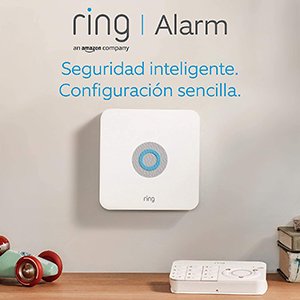
Even though Ring is an Amazon company, the arrival of Matter has opened the door for much better interoperability. In 2026, Ring Alarm’s integration with Google Home is both functional and reliable. You can arm the system in “Home” or “Away” modes and check its status with voice commands. To disarm, Google will prompt you for a verbal security code, adding an essential layer of protection.
The starter kit is comprehensive, and its installation is one of the easiest on the market. While it offers an optional subscription plan (Ring Protect Plus) for professional monitoring, the system is 100% functional without it, sending push notifications directly to your phone.
DIY Security System Comparison Chart (2026)
| Feature | Aqara Home Alarm | Eufy Security Alarm | Ring Alarm (Gen 3) |
|---|---|---|---|
| Price Range (Starter Kit) | $150 – $250 | $180 – $280 | $200 – $300 |
| Monthly Fee | None (required) | None (required) | None (optional plan) |
| What’s in the Box | Hub, 1 Door/Window Sensor, 1 Motion Sensor | HomeBase, Keypad, 1 Door/Window Sensor, 1 Motion Sensor | Base Station, Keypad, 1 Contact Sensor, 1 Motion Detector, 1 Range Extender |
| Matter Compatibility | Yes (with compatible Hubs) | Yes (on recent models) | Yes (via Bridge) |
| Primary Connectivity | Zigbee 3.0 | Wi-Fi & Proprietary Protocol | Z-Wave & Wi-Fi |
Professionally Monitored Systems with Google Home Integration
The landscape for professionally monitored security systems has changed dramatically. Gone are the days when security giants saw voice assistants as a threat. In 2026, most major US companies like ADT, Vivint, and SimpliSafe offer official integrations, though often with more locked-down features than their DIY counterparts.
These companies now provide official “Actions” for Google Assistant. These integrations typically allow you to:
- Arm the system: “Hey Google, arm my security system to Away.”
- Check the status: “Hey Google, is my security system armed?”
- Activate partial modes: Perfect for arming doors and windows at night.
For obvious security reasons, disarming by voice is usually disabled or requires a more complex verification process than with DIY systems.
For those who, like me, crave total control, unofficial integrations through Home Assistant are still a powerful option. The community maintains excellent integrations for many popular systems, which you can then expose to Google Home for ultimate command over your security setup.
Pros and Cons of Google Home Security Integration
Integrating your security system into your smart home has clear benefits, but there are also a few things to keep in mind.
The Upside
- Convenience: Arming your alarm with your voice when your hands are full is a true game-changer.
- Powerful Routines: You can create amazing automations. For instance, a “Goodbye” routine can arm the alarm, turn off all the lights, lower the blinds, and set the thermostat with a single command.
- Multi-purpose Sensors: An alarm’s motion sensor can also be used to turn on courtesy lights at night or trigger a bathroom fan.
- Cost Savings: DIY, no-fee systems eliminate a fixed monthly expense, which adds up to significant savings over time.
The Downsides
- Voice Security Concerns: The old fear of someone yelling “disarm” through a window has been addressed. In 2026, any sensitive action like disarming requires a verbal security PIN that you set up in advance.
- Internet Dependency: While the alarm itself will still function locally if your Wi-Fi goes down (the siren will blare), you’ll lose voice control and remote notifications until the connection is restored.
Frequently Asked Questions (FAQ)
- Is it actually safe to disarm an alarm with your voice in 2026?
- Yes. Voice PIN authentication is now a standard security feature in Google Home for critical actions. It’s a code only you know, and the assistant will prompt you for it before executing a disarm command.
- What happens if the power goes out?
- Most alarm base stations (like those from Ring or Eufy) include a backup battery to keep them running for several hours. Many also offer an optional cellular (4G/LTE) backup plan so you don’t lose your connection to the monitoring service or your phone notifications.
- Does Matter compatibility guarantee any alarm will work with Google Home?
- Matter has unified the market, but it’s not an ironclad guarantee. Always check that the product packaging specifically says “Works with Google Home” or shows its logo, in addition to being “Matter Certified.”
- Do I need a professional to install a smart alarm?
- For the DIY no-fee systems, absolutely not. They are designed for anyone to install in under an hour. The sensors are wireless and use adhesive strips. You just need to follow the step-by-step instructions in the mobile app.
Follow me on YouTube