
As an Amazon Associate, I earn from qualifying purchases. En calidad de Afiliado de Amazon, obtengo ingresos por las compras adscritas que cumplen los requisitos aplicables. If you buy through these links, the price is the same for you and Amazon pays me a small commission that helps keep Tecnoyfoto running.

Last updated on September 2, 2026
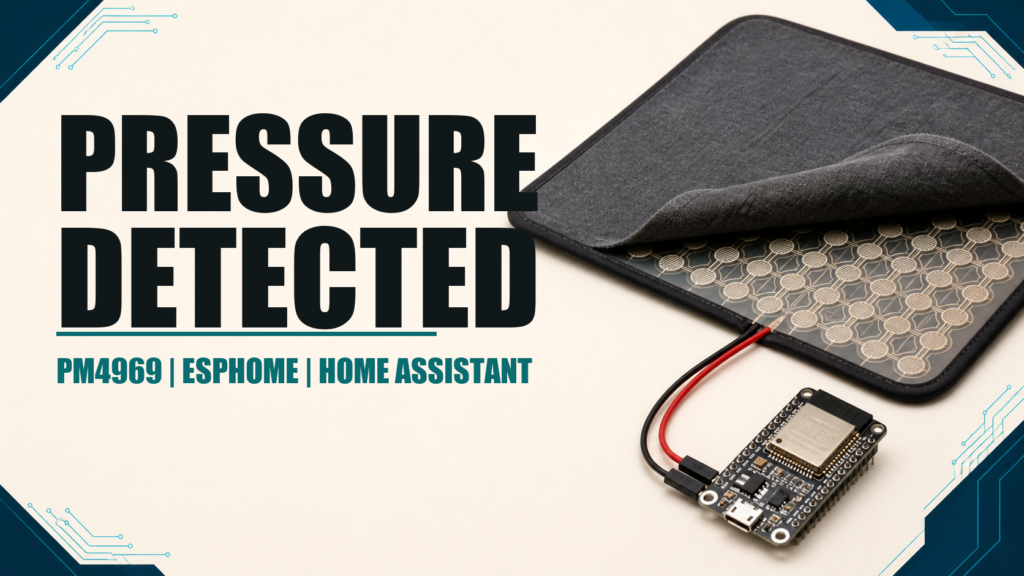
In the fast-paced smart home world of 2026, where AI-powered radar and presence sensors dominate the conversation, sometimes the most robust and reliable solution is the simplest. The PM4969 pressure sensor mat is a perfect example of this philosophy. This device, far from obsolete, has cemented its place as a cornerstone for countless DIY smart home projects. Its ability to unequivocally detect physical pressure makes it the perfect choice for automations where certainty is non-negotiable, integrating seamlessly with platforms like ESPHome and, of course, Home Assistant. In this definitive guide, I’ll show you why this Home Assistant pressure mat is still an essential component in my lab and how you can get the most out of it today.
Quick Analysis: PM4969 Pressure Mat Pros and Cons in 2026
Before we dive into the technical weeds, it’s crucial to understand where this sensor shines and what its limitations are compared to more modern tech. Here’s my straight-up assessment as an IoT engineer.
| ✅ Pros | ❌ Cons |
|---|---|
| Rock-Solid Reliability: Zero false positives. If it triggers, it’s because there’s actual physical pressure. Period. | Mechanical Wear: As a physical device, its lifespan is subject to use and foot traffic over time. |
| 100% Privacy-Proof: Unlike cameras or radar, it’s physically incapable of capturing personal information. It only detects weight. | Limited Detection: It can’t detect static presence without pressure. A person standing perfectly still is detected, but it can’t differentiate them from a heavy box. |
| Dirt Cheap: It’s one of the most cost-effective solutions for detecting occupancy in specific zones like beds, sofas, or doorways. | Physical Installation: It needs to be placed under a rug, mattress, or cushion, which might not be aesthetically ideal for every scenario. |
| Simple Integration: It functions as a simple switch, making it incredibly easy to connect to microcontrollers like the ESP32/ESP8266. | Binary Data Only: It only reports two states (pressed or not pressed), offering no proximity or position data like mmWave sensors do. |
Key Technical Specs of the PM4969
The PM4969 is more than just a mat; it’s a rugged contact sensor built to last. Its features make it ideal for being ‘invisible’ in the smart home, working silently and effectively under other surfaces.
| Feature | Description |
|---|---|
| Dimensions | 720 x 560 x 4.6 mm (28.3 x 22 x 0.18 inches) |
| Material | Seam-welded PVC, tough and durable |
| Main Contact Type | Normally Open (N/O) – Closes when pressure is applied |
| Anti-Tamper Function (Security) | Normally Closed (N/C) loop to detect wire cutting |
| Regulatory Compliance | RoHS & Reach |
| Operating Sensitivity | Detects 25 kg (~55 lbs) over a 50 mm² (~0.08 sq in) area |
| Included Wiring | 150 mm (~6 inches) of 0.22 mm² (~24 AWG) black PVC insulated wire |
Showdown: Pressure Mat vs. mmWave Presence Sensors in 2026
One of the most common questions I get is how this ‘classic’ technology stacks up against modern millimeter-wave (mmWave) radar sensors. The answer is: they don’t compete, they complement each other. Each has its rightful place in home automation.
| Criterion | Pressure Mat (PM4969) | Presence Sensor (mmWave) |
|---|---|---|
| Technology | Mechanical Contact (physical switch) | Millimeter-wave radar (e.g., Seeed Studio 60GHz) |
| Detection Type | Detects physical weight/pressure on a surface. | Detects motion (macro and micro, like breathing) and static presence in a 3D area. |
| Ideal Use Case | Bed, sofa, and chair occupancy. Entry detection when stepping on a doormat. | Room-level presence detection for controlling lights, HVAC, and security. |
| False Positives | Virtually zero. Only triggers with actual pressure. | Low, but can be triggered by pets, fans, or moving curtains if not calibrated correctly. |
| Privacy | Completely private. Captures zero identifiable data. | Extremely high. Captures no images, only a presence ‘map’. |
| Estimated Price Range | Low ($10-$15) | Mid-High ($25-$70) |
DIY Installation and ESPHome Configuration Guide
The real magic of this Home Assistant pressure mat is unleashed when you hook it up to a Wi-Fi-enabled microcontroller. My go-to choice for these projects is an ESP32 or ESP8266 due to their low cost and perfect compatibility with ESPHome.
The wiring is incredibly simple. The mat has two main wires that act as a normally open switch. When you step on it, the circuit closes. You just need to connect these two wires to a GPIO pin and a GND pin on your ESP board.
ESPHome Code for a Bed Occupancy Sensor
Once the hardware is wired up, the next step is adding the code to your ESPHome configuration file. This YAML is my go-to template for a bed occupancy sensor, optimized to prevent false triggers.
binary_sensor:
  - platform: gpio
    pin:
      number: GPIO4 # On Wemos D1 Mini boards, this is pin D2
      mode:
        input: true
        pullup: true
      inverted: true
    name: "Master Bed Occupancy"
    device_class: occupancy
    filters:
      - delayed_on: 1s
      - delayed_off: 2s
Code Breakdown:
platform: gpio: We’re telling ESPHome we are reading a digital input/output pin.pin: GPIO4: Defines the pin we’re using. Make sure to change this to match the pin you used on your board!mode: input/pullup: This is the secret sauce. It activates an internal resistor in the microcontroller. This ensures the pin’s state is stable (HIGH) when the mat isn’t pressed, preventing ‘floating’ or false readings.inverted: true: Because we’re using PULLUP, the pin is HIGH when there’s no pressure and gets pulled LOW when pressed. This line inverts the logic so ESPHome understands it correctly (ON when there’s pressure).device_class: occupancy: This helps Home Assistant interpret the sensor correctly, showing an “Occupied/Detected” status and icon instead of “Open/Closed”.filters: Thedelayed_onanddelayed_offfilters are crucial for usability. They prevent the sensor from rapidly flicking on and off if you shift your weight in bed. It will only register as ‘occupied’ after 1 second of continuous pressure and ‘clear’ after 2 seconds of no pressure.
Integrating with Home Assistant for Killer Automations
Once you’ve flashed the ESPHome code to your device, the Home Assistant integration is practically automatic. Thanks to the native API, your new sensor will pop up as a new entity, ready to go.
- Auto-Discovery: Home Assistant will discover the new ESPHome node on your network. Just click “Configure” and add it.
- Entity Available: Under “Settings” > “Devices & Services” > “Entities,” search for “Master Bed Occupancy” (or whatever you named it). You’ll see your new
binary_sensor. - Building the Automation: Now you can use this entity as a trigger or condition in your automations. For instance, to create a courtesy light that turns on when you get out of bed at night.
Automation Example: Smart Night Light
Head to “Settings” > “Automations & Scenes” and create a new automation with the following trigger and action:
- Trigger: State of the entity
binary_sensor.master_bed_occupancychanges fromontooff. - Condition: Time is between 11:00 PM and 7:00 AM.
- Condition: The room’s light sensor is below a certain threshold (e.g.,
10 lux). - Action: Call the
light.turn_onservice for the hallway light, with a low brightness (e.g.,brightness_pct: 10).
DIY Smart Home Projects & Practical Use Cases
The versatility of the PM4969 goes way beyond the bedroom. Here are a few ways I’ve used it in my own DIY smart home projects and what I’ve seen from the community:
- Discreet Security: Placed under the front doormat, it can trigger a notification or turn on exterior lights if someone is lingering at your door late at night.
- Smart Sofa: Tucked under the sofa cushions, it can trigger a “Movie Night” scene in Home Assistant: lowering the blinds, dimming the lights, and turning on the TV.
- Assisted Living Monitoring: In homes with elderly or dependent individuals, it can send an alert if a person gets out of bed in the middle of the night and doesn’t return within a reasonable time, or if they haven’t gotten up by a certain time in the morning.
- Office Energy Savings: Placed on a desk chair, it can turn off your monitor, power strip, and office lights when you get up, and power everything back on when you sit down.
- Interactive Art and Games: For the creative types, you can build interactive floors that trigger sounds or lights when certain areas are stepped on—perfect for kids’ rooms or art installations.
Price and Where to Buy the PM4969 Mat in 2026
One of the biggest advantages of the PM4969 remains its price. As of January 2026, you can find this mat for around $10-$15, depending on the retailer and current deals. It’s a minimal investment for the level of reliability and possibilities it unlocks.
It’s an extremely cost-effective automation and security solution. To buy the PM4969 Pressure Mat, you can check specialized electronics stores or find it on marketplaces like Amazon via this linkAffiliate link.
FAQ: Frequently Asked Questions
- How is it physically installed?
- Installation is super easy. Just place it in the desired location (under a mattress, rug, cushion) and connect the wires to your microcontroller.
- Can it detect pets?
- It depends on the pet’s weight. It’s calibrated to trigger with about 55 lbs in a small area, so a large dog could set it off, but a cat or small dog likely won’t.
- Is it waterproof?
- Its welded PVC construction makes it splash-resistant, but it is not submersible. You should avoid direct and prolonged exposure to water.
- What maintenance does it require?
- Practically none. Just keep it clean and avoid placing sharp objects on it.
- Can the mat be cut or modified?
- No. Cutting or modifying the mat is not recommended, as this will permanently damage the internal sensor contacts.
- What is the typical warranty?
- Warranty varies by distributor, but most sellers in the US offer a standard 1-year warranty. Always check with your specific supplier for details.
What the Community is Saying
- Mike D. – Chicago, IL
- “I use it to know if my elderly father gets out of bed at night. It gives me incredible peace of mind. The Home Assistant integration was instant.”
- Jessica P. – Austin, TX
- “An essential for my smart home projects. I have one on the couch and another at the front door. Zero issues in over a year.”
- David Chen – San Francisco, CA
- “For this price, there’s nothing more reliable for detecting if you’re in bed. No more lights turning off on their own because the motion sensor can’t see you.”
- Emily S. – Denver, CO
- “I was surprised by how sensitive yet robust it is. I have it under the rug in the kids’ playroom, and it works great to trigger music when they come in.”
Conclusion: A Timeless Essential in the Modern Smart Home
In conclusion, the PM4969 Home Assistant pressure mat proves that in the smart home of 2026, the newest or most complex technology isn’t always the best. Its simplicity is its greatest strength, offering presence detection based on physical pressure that is virtually foolproof and completely privacy-respecting. Its ease of integration with ESPHome and Home Assistant, combined with its rock-bottom cost, makes it the perfect tool for a huge range of home automations, from security and comfort to assisted living.
If you’re looking for a cheap, reliable, and versatile solution to detect occupancy on a bed, sofa, or specific spot on the floor, the PM4969 is still, in my opinion, one of the best investments you can make in your smart home.
Continue reading
Next related guide · 12 min read
Aqualin Mini-Click Rain Sensor with ESPHome and Home Assistant
I integrated an Aqualin Mini-Click rain sensor into Home Assistant using an ESP32 and ESPHome to replace my old resistive sensor setup. I wanted…
Continue with this article