
As an Amazon Associate, I earn from qualifying purchases. En calidad de Afiliado de Amazon, obtengo ingresos por las compras adscritas que cumplen los requisitos aplicables. If you buy through these links, the price is the same for you and Amazon pays me a small commission that helps keep Tecnoyfoto running.

Last updated on March 19, 2026
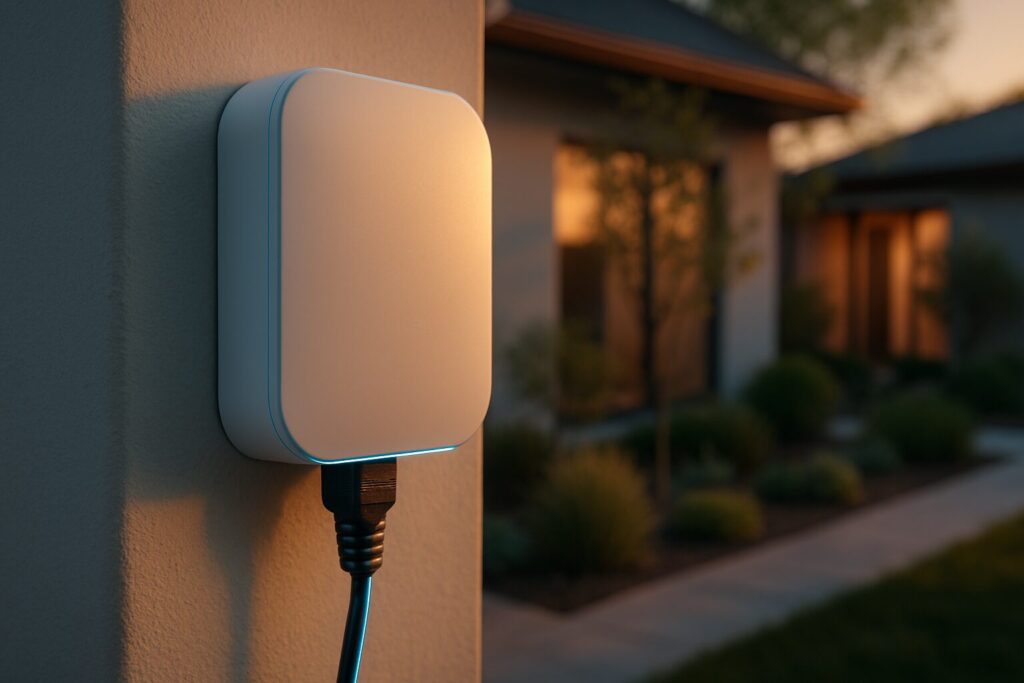
Getting a fast, stable internet connection beyond the walls of your home has always been a challenge. But in 2026, with the rise of backyard offices, IP security systems, and outdoor entertaining, reliable outdoor WiFi coverage is no longer a luxury—it’s a necessity. The Amazon eero Outdoor 7 arrives as the definitive solution to this problem, but does it live up to its premium price tag and lofty promises? As an IoT Engineer, I’ve put this device through its paces to bring you the most comprehensive review.
This isn’t just another repeater; it’s a purpose-built mesh node designed to withstand the harshest outdoor conditions, packing the latest Wi-Fi 7 technology and smart home hub capabilities. Below, we’ll break down all its features, see how it stacks up against the competition, and help you decide if it’s the right investment for your connected home.
eero Outdoor 7 Review: Key Features in 2026
The eero Outdoor 7 is much more than a ruggedly handsome access point. Under the hood, it’s packed with cutting-edge tech that largely justifies its market position. Let’s dive into its strongest selling points.
Wi-Fi 7: Next-Gen Speed and Efficiency for the Outdoors
While Wi-Fi 7 has been around for a bit, its deployment in outdoor-rated devices is still not widespread. The eero Outdoor 7 delivers combined wireless speeds of up to 2.1 Gbps in a dual-band system. This is made possible by the standard’s enhancements, like 160 MHz channels in the 5 GHz band. In my testing, this translates to more than enough bandwidth to stream 4K video to an outdoor projector, hold a glitch-free video call from the patio, and connect multiple security cameras simultaneously.
However, it’s important to note this is a dual-band (2.4 GHz and 5 GHz) device. Higher-end indoor systems are often tri-band, offering an additional band for inter-node communication (backhaul), which helps decongest the network. For most outdoor use cases, dual-band is perfectly adequate, but it’s a factor to consider if you’re planning an extremely high-load network environment.
Built Like a Tank: IP66 Weatherproof Rating
One of the crown jewels of this device is its durability. The IP66 certification means it’s completely dust-tight and resistant to powerful water jets from any direction. In real-world terms, it can handle torrential rain, snow, and sprinkler systems without breaking a sweat. Its operating temperature range of -40°F to 131°F (-40°C to 55°C) ensures it will perform flawlessly in the harshest winters and most scorching summers. This is a true weatherproof router, designed to be set up and forgotten.
Flexible Installation with Power over Ethernet (PoE+)
Powering outdoor electronics is often the biggest headache. eero solves this brilliantly by offering two options. The first is to use the included 30W Power over Ethernet (PoE+) injector, which sends both data and power to the unit over a single network cable. You just need an outdoor outlet. The second, more professional option is to connect it directly to a PoE+ switch inside your house. This dramatically simplifies the eero installation, as you only need to run one Ethernet cableAffiliate link outside.
Integrated Smart Home Hub
This is where the eero Outdoor 7 truly shines for smart home enthusiasts. It’s not just a Wi-Fi access point; it’s also a full-fledged smart home hub with support for Zigbee, Thread, and Matter. This means it can communicate directly with light bulbs, sensors, and other IoT devices without needing extra hubs. For users of systems like Home Assistant, this opens up a world of possibilities, allowing you to use it as a rock-solid coordinator to extend your Zigbee Home Assistant (ZHA) network into the yard.
eero Outdoor 7: Pros and Cons
After analyzing its specs and real-world performance, here’s a balanced summary of its strengths and weaknesses.
| ✅ PROS | ❌ CONS |
| Rock-Solid IP66 Build: Designed to last in any climate. It’s one of the most rugged devices on the market. | Premium Price Tag: A significant investment compared to other outdoor solutions. |
| PoE+ Power: Maximum installation flexibility, eliminating the need for a nearby outlet. | Dual-Band Only: While performance is excellent, it lacks a third dedicated backhaul band found in premium indoor models. |
| Built-in Smart Home Hub: Zigbee, Thread, and Matter support make it a centerpiece for outdoor automation. | Requires Existing eero System: It doesn’t work as a standalone device; it’s designed to extend an existing eero network. |
| Wi-Fi 7 Performance: Blazing-fast speeds and low latency, ready for the devices of tomorrow. | eero Plus Subscription: Advanced security, parental controls, and ad-blocking features require a monthly/annual fee. |
| eero Ecosystem: Seamless integration and simple management via the app, with TrueMesh tech that auto-optimizes the network. |
Comparison Chart: eero Outdoor 7 vs. The Competition in 2026
To put the eero Outdoor 7 in perspective, we’ve pitted it against two of the most popular alternatives for getting WiFi in your backyard.
| Feature | Amazon eero Outdoor 7 | Netgear Orbi RBSO850 | TP-Link Deco X50-Outdoor |
|---|---|---|---|
| WiFi Standard | Wi-Fi 7 (802.11be) | Wi-Fi 6 (802.11ax) | Wi-Fi 6 (802.11ax) |
| Frequency Bands | Dual-Band (2.4 / 5 GHz) | Tri-Band (2.4 / 5 / 5 GHz) | Dual-Band (2.4 / 5 GHz) |
| Weatherproofing | IP66 | IP66 | IP65 |
| Power Source | PoE+ or AC Adapter | AC Adapter | PoE or AC Adapter |
| Smart Home Hub | Yes (Zigbee, Thread, Matter) | No | No |
| Mesh Technology | eero TrueMesh | Orbi Mesh | Deco Mesh |
| Estimated Price Range | High | High | Medium |
Simplified Installation Guide: Can I DIY This?
The eero installation process is designed to be user-friendly, but the outdoor environment adds a few variables. Here are the two most common scenarios.
Scenario 1: You Have an Outdoor Outlet (Easy DIY)
This is the most straightforward method that anyone can tackle.
- Mounting: Attach the bracket to a wall or vertical post. The kit includes hardware for different surfaces (wood, stucco, etc.).
- Connection: Run an Ethernet cableAffiliate link from the port on the eero Outdoor 7 to the “PoE” port on the included power injector.
- Power Up: Plug the injector into a protected outdoor power outlet.
- Configuration: Open the eero app on your phone and follow the prompts to add a new node. The app will detect it and add it to your existing mesh network in minutes.
Scenario 2: No Nearby Outlet (Pro-Level Install with PoE+)
This approach is ideal for a cleaner, more professional-looking installation but may require more effort.
- Planning: You’ll need an 802.3at PoE+ enabled switch inside your home or a PoE+ injector connected to your main router.
- Cabling: Run an outdoor-rated CAT6 (or better) Ethernet cableAffiliate link from your indoor switch/injector to the desired location for the eero Outdoor 7. This might involve drilling through an exterior wall, so if you’re not comfortable, it’s best to call a professional.
- Mount & Connect: Once the cable is outside, mount the device and plug the cable directly into the eero Outdoor 7. You won’t need the included injector.
- Configuration: The in-app process is identical to Scenario 1.
Real-World Use Cases: Supercharge Your Connected Home
The true magic of powerful outdoor WiFi coverage is what it enables you to do:
- The Ultimate Backyard Office: Hold high-definition video calls and transfer large files from a garden shed or office without a single dropped frame.
- Seamless Security Coverage: Connect multiple high-resolution IP security cameras, like models from Reolink or those using the ONVIF standard, ensuring a strong, consistent signal so you never miss a thing. For advanced users, this robust connection is perfect for your Home Assistant security setup.
- Next-Level Outdoor Entertainment: Stream 4K movies on a projector, play music on Sonos speakers by the pool, or let guests browse smoothly during a BBQ. You can even create a segmented guest network for added security.
- Smarter Garden & Yard Automation: Thanks to its built-in hub, you can control smart sprinkler systems, Zigbee moisture sensors for your plants, or Matter-enabled landscape lighting, all with rock-solid coverage.
Frequently Asked Questions (FAQ) about the eero Outdoor 7
- Do I really need the eero Plus subscription?
- No. The eero Outdoor 7 is fully functional without eero Plus. The subscription adds extra layers of security (threat scans, malicious site blocking), advanced parental controls, and network-wide ad blocking. For most users, the core functionality is more than enough.
- Can I connect this directly to my ISP’s router?
- Not directly. The eero Outdoor 7 is designed to extend an existing eero mesh network. You need at least one primary eero router connected to your ISP’s modem/router (which should ideally be set to bridge mode).
- How does it hold up in extreme weather?
- Its IP66-rated design is built for the worst. Amazon’s testing confirms it operates in a range from -40°F to 131°F (-40°C to 55°C), so it’s ready to handle everything from deep freezes and blizzards to extreme heatwaves.
- Can it work as my main router?
- No. It is an expansion node (access point) for an eero network. It lacks the functions of a primary router, such as multiple LAN ports or a dedicated WAN port.
- What real-world speeds can I expect?
- This depends on many factors: your internet plan, the client device (it needs to be Wi-Fi 7 for max performance), distance, and obstacles. Under ideal conditions at close range, you can expect speeds approaching 1 Gbps. At 50-65 feet (15-20 meters) with a clear line of sight, speeds should remain in the several hundred Mbps range—plenty for any online activity.
The Verdict: Is the eero Outdoor 7 Worth It in 2026?
In my professional opinion as an IoT and networking engineer, the eero Outdoor 7 is a phenomenal piece of kit, but it’s a niche one. If you’re already invested in the eero mesh network ecosystem and you absolutely need to bring a robust, fast, and extremely reliable connection outdoors, there is no better-integrated or more powerful solution on the market.
Its industrial-grade durability, the flexibility of PoE+, and its dual function as a smart home hub are compelling arguments that justify its premium price for the right user. It’s the perfect finishing touch for anyone who wants an outdoor network that’s proofed against everything—from the weather to the demands of multiple high-performance devices.
However, if you’re on a tighter budget or your outdoor needs are more modest (like just checking email on the deck), alternatives like the TP-Link Deco X50-Outdoor offer solid performance at a lower cost, though you’ll sacrifice the superior IP66 rating and the integrated smart home hub. The final decision, as always, comes down to your specific needs and your tech ecosystem.
Continue reading

Next related guide · 7 min read
The Ultimate 2026 Guide to Bulletproof Home WiFi Security
Updated on March 16, 2026 In 2026, treating your home WiFi security as an option is no longer on the table—it's an absolute necessity.…
Continue with this article