
As an Amazon Associate, I earn from qualifying purchases. En calidad de Afiliado de Amazon, obtengo ingresos por las compras adscritas que cumplen los requisitos aplicables. If you buy through these links, the price is the same for you and Amazon pays me a small commission that helps keep Tecnoyfoto running.

Last Updated: February 7, 2026
Let’s be real: the idea of trusting your home’s security to a smart lock, especially one linked to an assistant like Google Home, used to feel a little sketchy. But in 2026, that’s ancient history. Thanks to mature communication standards and rock-solid encryption protocols, the best Google Home smart locks have become a cornerstone of modern smart home security, often surpassing traditional mechanical locks in both safety and convenience.
Far from being a weak link, a well-chosen and properly installed smart lock actually boosts your security while offering a level of control you couldn’t dream of years ago. Forget stashing a key under the mat (and the anxiety that comes with it). Stop worrying about lost keys or getting locked out. Now, you can grant temporary access to a delivery driver, get an instant notification if the door is left ajar, or let a family member in from halfway across the world. I’ve spent weeks testing the current market to bring you the definitive guide to the best smart locks of 2026, so you can find the perfect fit for your home.
Key Factors for Choosing a Smart Lock in 2026
Before you click “buy,” it’s crucial to understand the tech inside. In 2026, not all locks are created equal. Here are the critical factors I considered in my hands-on testing:
- Connectivity Protocol: How your lock talks to your phone and smart home ecosystem is everything.
- Wi-Fi: Offers a direct-to-internet connection without needing a separate hub, but it can be a battery hog. The latest 2026 models have drastically improved their power efficiency.
- Bluetooth: Perfect for close-range control with very low power consumption. It requires a hub or bridge for remote access.
- Zigbee/Z-Wave: Low-power protocols that create incredibly stable mesh networks. They require a dedicated hub. If you’re a Home Assistant power user, a coordinator like the SMLIGHT SLZB-06 paired with Zigbee2MQTT or ZHA gives you bulletproof local control with zero cloud dependency.
- Matter: The standard that’s finally unifying the smart home. Matter over Thread is the winning combination in 2026, offering a secure, low-power, local mesh network with unprecedented interoperability between brands and ecosystems (Google Home, Alexa, Apple HomeKit). If you’re looking for a future-proof investment, prioritize Matter compatibility.
- Installation Type:
- Retrofit: These install on the *inside* of your door, over your existing deadbolt hardware. They’re easy to install (often in minutes) and let you keep using your original physical key from the outside. Perfect for renters.
- Full Replacement: These replace your entire deadbolt mechanism, inside and out. They usually offer more entry methods (keypads, fingerprint sensors) and a more seamless, integrated look.
- Security & Certification: Look for locks with an ANSI/BHMA Grade certification (Grade 1 or 2 is excellent for residential use), which tests for durability and security against physical attacks. On the digital side, demand end-to-end encryption using AES 128-bit or 256-bit standards. Any serious brand in 2026 will have this.
- Power Source: Most run on AA batteries or a rechargeable battery pack. In 2026, you should expect 6-12 months of battery life. All the models I recommend send low-battery notifications weeks in advance.
Comparison Chart: Best Google Home Compatible Smart Locks (2026)
| Model | Installation Type | Connectivity | Price Range (Est.) | Key Features |
|---|---|---|---|---|
| Nuki Smart Lock 5.0 ProAffiliate link | Retrofit | Built-in Wi-Fi, Bluetooth, Matter | $299 – $379 | Ultra-fast installation, rechargeable Power Pack, native Matter support. |
| August Wi-Fi Lock Pro (5th Gen) | Retrofit | Built-in Wi-Fi, Bluetooth | $269 – $319 | Compact design, DoorSense (knows if door is open/closed), reliable Geo-fencing Auto-Unlock. |
| Yale Assure Lock 2 Plus with MatterAffiliate link | Full Replacement | Wi-Fi, Bluetooth, Matter over Thread | $329 – $399 | Touchscreen keypad, Apple Home Key support, sleek design, rock-solid reliability. |
| Aqara Smart Lock U200Affiliate link | Full Replacement | Bluetooth, Zigbee (with Aqara Hub) | $239 – $299 | Fingerprint reader, keypad, NFC, physical key. Great ecosystem and value. |
In-Depth Smart Lock Reviews (2026)
Here’s the breakdown of the models that I consider the absolute best options on the market in 2026 for access control with Google Home.
Best Retrofit Smart Locks (Installs Over Existing Hardware)
These locks are the perfect choice if you don’t want to—or can’t—change your existing deadbolt. They mount on the inside of your door in minutes.
Nuki Smart Lock 5.0 ProAffiliate link
Nuki has been a leader for years, and the 5.0 Pro version solidifies its position. The installation is ridiculously easy: it clamps onto your existing cylinder in under 3 minutes, no drilling required. The big upgrade here is the inclusion of native Wi-Fi and Matter support, eliminating the need for the old Nuki Bridge for remote control. Its motor is fast and quiet, and the included USB-C rechargeable Power Pack provides excellent battery life. The app is, in my opinion, the most comprehensive on the market, allowing for granular permission control and a detailed activity log. It’s fully compatible with Google Home, Alexa, and Apple HomeKit.
 Affiliate link
August Wi-Fi Lock Pro (5th Generation)Affiliate link
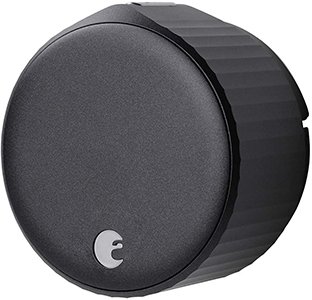
August is the other giant in the retrofit space. Its 5th-gen model keeps the signature circular design but in an even more compact form factor. Like the Nuki, it connects directly to your 2.4 GHz Wi-Fi network without a bridge. Its DoorSense™ technology is a key differentiator: a small magnetic sensor lets the lock know not only if the bolt is thrown, but if the door is physically closed. This prevents false locks and adds an extra layer of security. Its Auto-Unlock feature, which uses your phone’s geolocation to unlock the door as you approach, is one of the most reliable I’ve tested. Fully compatible with Google Home and all major assistants.
 Affiliate link
Best Full Replacement Smart Locks (Replaces All Hardware)
If you’re looking for an all-in-one solution with multiple ways to get in, these locks that replace your entire deadbolt are your best bet.
Yale Assure Lock 2 Plus with MatterAffiliate link
Yale is synonymous with security, and the Assure Lock 2 Plus is proof. This 2026 model stands out for its native Matter over Thread support, guaranteeing an ultra-fast and stable local connection. The design is clean and elegant, with a backlit touchscreen keypad that appears on touch. Besides a code, it allows entry via the app, a physical key, and for Apple users, Home Key (by tapping your iPhone or Apple Watch). The auto-lock feature is configurable, giving you peace of mind that the door is always secure. The integration with Google Home is flawless, allowing you to lock, unlock (with a voice PIN), and check the status instantly.
 Affiliate link
Aqara Smart Lock U200Affiliate link
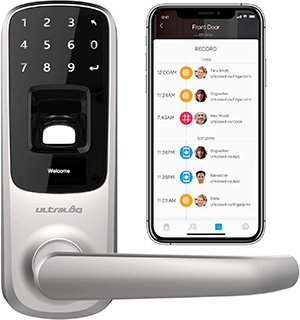
Aqara has earned its spot in the smart home world for its incredible value and robust Zigbee ecosystem. The U200 is a full replacement lock that offers astounding versatility. It features a lightning-fast biometric fingerprint reader, a numeric keypad, NFC entry (with cards or a phone), app control via Bluetooth, and, of course, a physical key for emergencies. To integrate it with Google Home and get remote control, you’ll need an Aqara hub, but this also connects it to a powerful ecosystem you can expand with dozens of affordable and reliable sensors. It’s a fantastic option for anyone already in—or planning to join—the Aqara ecosystem.
 Affiliate link
Pro Installation Tips & Best Practices
Installing a smart lock isn’t rocket science, but you have to follow the steps carefully. Here are my engineering–backed tips:
- Don’t Power It On Early: This is the #1 rookie mistake. Most smart locks perform a calibration on first boot to detect the door’s orientation (left-hand vs. right-hand swing). If you power it on while it’s still on your table, the calibration will fail. Install it *completely* on the door, and only then insert the batteries.
- Factory Reset If Needed: If you messed up step one, don’t panic. Once the lock is mounted, perform a factory reset. This will force a fresh calibration cycle when it reboots.
- Check Your Connectivity: If your lock uses a hub, make sure the hub has good Wi-Fi coverage and is within a reasonable distance of the lock (check the manual). If it’s a direct Wi-Fi lock, ensure your 2.4 GHz signal is strong at the door. A weak signal causes dropouts and drains the battery fast.
- Ensure Deadbolt Compatibility: For retrofit locks, it’s critical that your deadbolt operates smoothly. If you have to jiggle the key or push on the door to get it to lock, a smart lock motor will struggle and fail. Fix the underlying alignment issue first! Also, ensure your key works from the outside even if the interior thumbturn isn’t perfectly centered, otherwise you might nullify your emergency key access.
Google Home Integration: Voice Commands & Advanced Automations
Once your lock is installed and set up in its native app, linking it to Google Home is simple. Just open the Google Home app, tap “Devices,” “Add,” “Works with Google,” and search for your lock’s brand to link your account.
Once linked, you can use voice commands like:
- “Hey Google, lock the front door.”
- “Hey Google, is the front door locked?”
- “Hey Google, unlock the front door.” (For security, Google will require a voice PIN that you set up beforehand).
But the real power lies in automating your door with Google Home Routines. You can create custom flows:
- “I’m leaving” Routine: Saying “Hey Google, I’m leaving” can be programmed to lock your door, turn off all the lights, adjust the thermostat, and arm your security system.
- “Good night” Routine: Locks the door, turns off the living room lights, and turns on your bedroom lamp.
- Geofencing (via the lock’s app): Many native apps allow the door to auto-lock when it detects that the last family member’s phone has left the immediate area.
Integrating one of the best Google Home smart locks in 2026 transforms your front door from a simple entry point into an active, secure, and intelligent part of your connected home.