

Updated August 21, 2026.
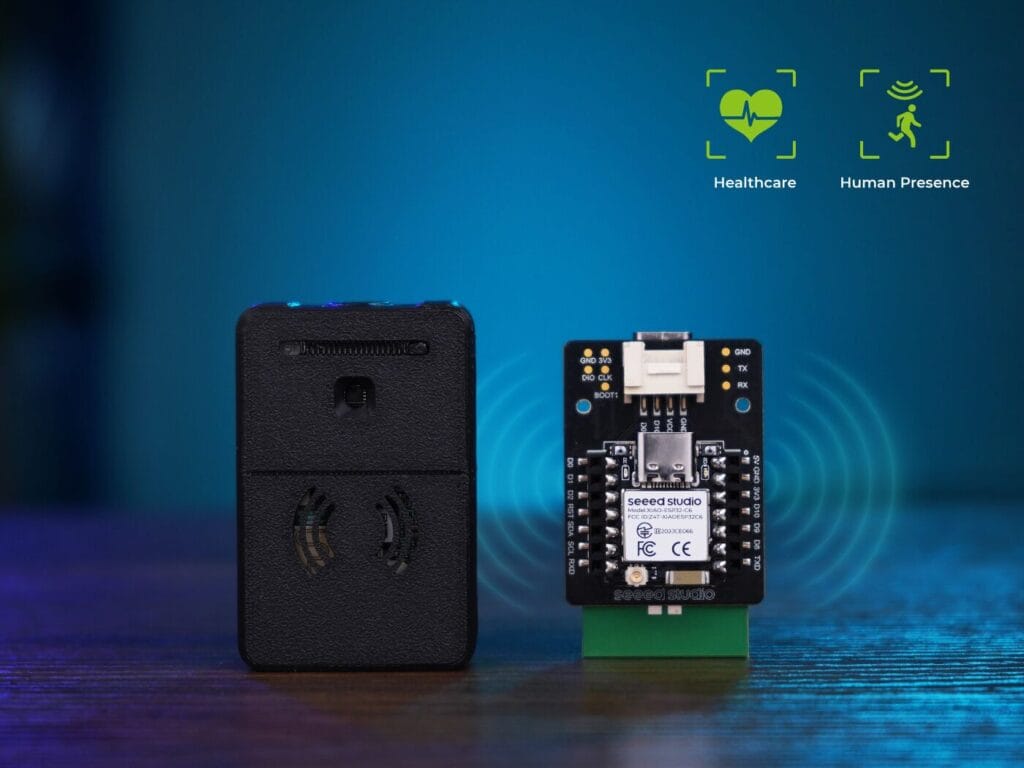
The Seeed Studio MR60BHA2 is a 60 GHz mmWave radar kit designed to detect human presence and estimate breathing and heart rate without a camera or microphone. It combines the radar module with a XIAO ESP32-C6, Wi-Fi, a BH1750 light sensor, and an RGB LED, and it integrates directly with Home Assistant through ESPHome.
The original Spanish guide was extensive, but it mixed the old external component with current support, placed example credentials directly in YAML, and overstated several capabilities. This version provides a secure current configuration, explains the difference between MR60BHA2 and MR60FDA2, and sets realistic limits for vital-sign data.
Quick verdict
- It is a good fit for stationary presence in a bedroom, office, or defined area and for experimenting with estimated breathing and heart rate.
- It is not a medical device. Do not use it for diagnosis, clinical monitoring, or any automation whose failure could endanger someone.
- ESPHome now includes an official component, so a new installation does not need to download
external_componentsfrom GitHub. - There are two separate firmware layers. ESPHome on the XIAO supports OTA updates; the radar’s internal firmware requires USB and Seeed-specific tools.
- Do not confuse it with the MR60FDA2, which targets fall detection and uses a different component and firmware.
What the MR60BHA2 kit includes
| Part | Purpose |
|---|---|
| 60 GHz MR60BHA2 radar | Presence, distance, target count, and estimated breathing and heart rate. |
| XIAO ESP32-C6 | Runs ESPHome, connects over Wi-Fi, and sends entities to Home Assistant. |
| BH1750 | Measures illuminance over I²C. |
| WS2812 RGB LED | A visual indicator controlled by ESPHome. |
| Enclosure and USB-C | Power and XIAO access; some radar tasks require physical access inside the enclosure. |
The radar does not create a recognizable image of the room and is more private than a camera. Presence and behavior data are still sensitive, so protect Home Assistant, ESPHome, and your local network.
MR60BHA2 versus MR60FDA2
| Model | Primary use | ESPHome component |
|---|---|---|
| MR60BHA2 | Presence and estimated breathing and heart rate. | seeed_mr60bha2 |
| MR60FDA2 | Presence and fall detection with installation parameters. | seeed_mr60fda2 |
Never swap firmware files between models. Seeed warns that flashing the wrong firmware can render the radar unusable. Check the model printed on the module and download resources intended for that exact revision.
Entities exposed by the official component
| Entity | Practical meaning |
|---|---|
has_target | Whether the radar currently reports human presence. |
distance | Straight-line distance to the target reported by the radar. |
num_targets | Target count reported by the firmware; it is not an infallible people counter. |
breath_rate | Estimated breaths per minute under suitable conditions. |
heart_rate | Estimated beats per minute; it is not a clinical measurement. |
| Illuminance | Provided by the kit’s BH1750, not by the radar component. |
Breathing and heart-rate estimates require a relatively still person who is aligned with the radar and inside its useful area. Clothing, posture, other people, movement, and placement can degrade readings. These values can be interesting for graphs or low-risk context, but they must never determine whether someone needs medical attention.
Two firmware layers you must keep separate
1. ESPHome firmware on the XIAO ESP32-C6
This layer manages Wi-Fi, API access, OTA, entities, the LED, and local automations. You can update it from ESPHome Device Builder after the device joins your network.
2. Internal MR60BHA2 radar firmware
This layer processes the 60 GHz signal and generates the UART data. Seeed’s documentation says it can only be updated over USB inside the enclosure with dedicated software. Updating ESPHome YAML does not update the radar. Home users can customize ESPHome, but they cannot treat the radar’s internal features or zones as open firmware.
Quick setup with factory firmware
- Power the kit over USB-C with a stable supply.
- Join the
seeedstudio-mr60bha2access point and open192.168.4.1. - Enter the local Wi-Fi credentials and wait for the device to connect.
- In Home Assistant, open Settings → Devices & services and accept the discovered ESPHome device.
- Assign it to an area and watch presence, distance, light, and estimated vital metrics for several minutes.
- Update radar firmware only when Seeed recommends it for your revision and follow the exact procedure.
If the XIAO must be reflashed, Seeed provides a web tool and a factory.bin image for ESPHome Web. Browser flashing requires Chrome or Edge; Firefox does not expose the required serial interface.
Current secure ESPHome YAML
This example uses the built-in official component. It intentionally omits the Git-based external_components block required by the old implementation.
substitutions:
  device_name: seeed-mr60bha2
  friendly_name: Seeed MR60BHA2

esphome:
  name: ${device_name}
  friendly_name: ${friendly_name}

esp32:
  board: esp32-c6-devkitc-1
  variant: esp32c6
  flash_size: 4MB
  framework:
    type: esp-idf

logger:
  hardware_uart: USB_SERIAL_JTAG

wifi:
  ssid: !secret wifi_ssid
  password: !secret wifi_password
  ap:
    ssid: "${friendly_name} Fallback"
    password: !secret fallback_password

captive_portal:

api:
  encryption:
    key: !secret api_encryption_key

ota:
  - platform: esphome
    password: !secret ota_password

uart:
  id: uart_bus
  rx_pin: GPIO17
  tx_pin: GPIO16
  baud_rate: 115200
  parity: NONE
  stop_bits: 1

i2c:
  id: bus_a
  sda: GPIO22
  scl: GPIO23
  scan: true

seeed_mr60bha2:
  id: mr60bha2_radar
  uart_id: uart_bus

binary_sensor:
  - platform: seeed_mr60bha2
    has_target:
      name: "${friendly_name} Presence"

sensor:
  - platform: seeed_mr60bha2
    breath_rate:
      name: "${friendly_name} Breathing Rate"
    heart_rate:
      name: "${friendly_name} Heart Rate"
    distance:
      name: "${friendly_name} Distance"
    num_targets:
      name: "${friendly_name} Targets"

  - platform: bh1750
    name: "${friendly_name} Illuminance"
    address: 0x23
    update_interval: 10s

light:
  - platform: esp32_rmt_led_strip
    id: status_led
    name: "${friendly_name} LED"
    pin: GPIO1
    num_leds: 1
    rgb_order: GRB
    chipset: ws2812
Validate the YAML before installing it. If your hardware revision differs, compare pins and peripherals with the official schematic. An incorrect configuration can break UART communication with the radar while the ESP32 still appears online.
Placement and practical calibration
- Aim the front of the radar toward the torso and avoid metal obstructions.
- Start with one person and no directed fans, moving curtains, or pets in the test area.
- Seeed’s current troubleshooting notes specify up to 4 meters for static presence with radar firmware v1.6.12 or later; vital estimates require closer and more controlled placement.
- Do not assume it cleanly stops at every wall. Materials and angles can create detection outside the room or missed targets.
- Observe activation and clear times for several days before controlling lighting or HVAC.
Recommended automations
Lighting from presence and illuminance
Combine has_target with the BH1750 so a lamp turns on only when the room is dark. Add a delayed off action to avoid reacting to brief presence losses.
alias: Bedroom light from MR60BHA2
triggers:
  - trigger: state
    entity_id: binary_sensor.seeed_mr60bha2_presence
    to: "on"
conditions:
  - condition: numeric_state
    entity_id: sensor.seeed_mr60bha2_illuminance
    below: 40
actions:
  - action: light.turn_on
    target:
      entity_id: light.bedroom
HVAC from sustained occupancy
Require several minutes of presence before enabling comfort mode and wait before turning it off. Do not use num_targets as though it were an exact head count.
Experimental graphs
You can graph breathing and heart-rate estimates to learn how placement affects the radar. Label the entities as estimates, and avoid medical alarms, sleep diagnoses, or health conclusions.
Migrating from the old configuration
If an MR60BHA2 already works with the external repository, do not change it blindly. Save the YAML and download a copy of the known-good firmware first. Then update ESPHome, remove only the external_components block, and validate without installing.
- Record the ESPHome version, exact model, and project version shown in logs.
- Verify that every platform name uses
seeed_mr60bha2. - Add an explicit
uart_idand retain the UART, I²C, and pins that already work for your revision. - Move Wi-Fi, API, OTA, and fallback credentials to
secrets.yaml. - Compile and review warnings before performing an OTA update.
- After installation, compare every entity and the UART logs with the previous build.
This migration changes the source of the ESPHome component, not the radar’s internal firmware. If presence or vital estimates change after a separate radar update, review Seeed’s release notes.
Real-world scenarios and limits
Bedroom
It can maintain occupancy while someone remains still and turn lights off after a confirmed absence. Aim it so the torso stays inside the useful area, but never turn breathing estimates into an apnea or emergency detector.
Home office
It can keep lighting and HVAC active while someone works at a desk. A moving empty chair, a fan, or activity through a thin partition may require repositioning or additional time conditions.
Shared living room
num_targets adds context but does not identify people or guarantee a count when occupants are close together. Treating the room as occupied or clear is more robust for family automations.
Security
It can complement an alarm with sustained presence, but it cannot distinguish an intruder from a resident or pet. Combine it with alarm state, doors, schedules, and another confirmation source; never trigger a dangerous response from this sensor alone.
Privacy and network security
- Use API encryption and an OTA password; never expose the node directly to the Internet.
- Do not publish screenshots containing network names, passwords, IP addresses, or API keys.
- Limit retention of breathing and heart-rate graphs in rooms used by several people.
- Tell occupants what is recorded even though the device has no camera.
- Keep a copy of stable firmware before experimenting with new releases.
Pre-installation checklist
- MR60BHA2 model confirmed—not MR60FDA2 or MR60BHA1.
- Stable USB-C supply and a data cable available for recovery.
- Current ESPHome release with ESP32-C6 and the official component.
- Passwords and keys created in
secrets.yaml. - Test location with no metal in front and adequate Wi-Fi coverage.
- Initially low-risk automations with reasonable delays.
mmWave versus PIR
| Area | MR60BHA2 mmWave | PIR |
|---|---|---|
| Stationary person | Can maintain presence from micro-movement | May clear when thermal movement stops |
| Privacy | No image or audio | No image or audio |
| Data | Presence, distance, and additional estimates | Binary motion |
| Power and cost | Generally higher | Generally lower |
| False positives | Environmental motion, objects, and out-of-zone detection | Thermal changes and movement |
| Best use | Stationary presence and local context | Fast motion and simple automations |
Many rooms benefit from both: PIR reacts quickly when someone enters, while mmWave keeps occupancy active when the person sits or sleeps.
Troubleshooting
| Problem | Check |
|---|---|
| No setup access point | USB-C data cable, power, XIAO firmware, and Seeed’s recovery procedure. |
| ESPHome is online but radar data is missing | UART, GPIO16/17, 115200 baud, NONE parity, one stop bit, and internal connection. |
| No illuminance entity | I²C bus, GPIO22/23, address 0x23, and the BH1750 revision. |
| Presence remains on | Orientation, moving objects, fans, pets, reflections, and current radar firmware. |
| Unstable breathing or heart rate | Distance, alignment, motion, multiple people, and settling time. |
| An OTA update does not change radar behavior | OTA only updates ESPHome on the XIAO; the radar uses separate firmware. |
| An old guide no longer compiles | Remove external_components and use the official component in current ESPHome. |
Buying the correct revision
Confirm that the product includes the XIAO ESP32-C6 and is labeled MR60BHA2. Prices and accessories change, so this guide does not provide a fixed price. You can check the Seeed Studio MR60BHA2 product page; the link may earn a commission at no additional cost.
Related guides
- What ESPHome is and how it works.
- Secure ESPHome Wi-Fi and troubleshooting.
- Secure ESPHome OTA updates.
Checked official sources
- Official ESPHome MR60BHA2 component.
- Official Seeed Home Assistant guide.
- MR60BHA2 setup and firmware documentation.
- MR60BHA2 technical specification.
Frequently asked questions
Do I still need the external Git component?
Not for a current installation. seeed_mr60bha2 is now an official ESPHome component. The external repository remains useful for history and manufacturer resources, but adding it creates an unnecessary dependency.
Can it detect multiple people?
The component exposes num_targets, but the result depends on firmware, distance, separation, and movement. Do not use it as an occupancy counter.
Does it measure sleep, breathing, and heart rate with medical accuracy?
No. It provides contactless estimates under specific conditions. Use certified equipment and professional guidance for health or safety decisions.
Can everything be updated over OTA?
No. OTA updates ESPHome on the XIAO. The MR60BHA2 radar has separate firmware, and the official procedure requires USB access.
The MR60BHA2 is most useful when it is used for what it does well: stationary presence and local environmental context, with vital metrics treated as experimental. The official component, protected credentials, and a correct understanding of the two firmware layers make this installation much easier to maintain than the old configuration.