
As an Amazon Associate, I earn from qualifying purchases. En calidad de Afiliado de Amazon, obtengo ingresos por las compras adscritas que cumplen los requisitos aplicables. If you buy through these links, the price is the same for you and Amazon pays me a small commission that helps keep Tecnoyfoto running.

Last updated on February 7, 2026
The thought of an Alexa smart lock used to freak people out, and for good reason. For many, it felt like trading physical security for digital convenience. But let’s be clear: in 2026, that perception is completely outdated. Thanks to massive leaps in encryption, communication protocols, and the maturity of the entire smart home ecosystem, these locks have become fortresses of security and convenience. Let’s break down why a connected lock isn’t just safe—it’s a quantum leap forward in managing access to your home.
Why a Smart Lock is the New Security Standard in 2026
The very concept of a “key” has evolved. It’s no longer just a piece of metal you can lose, have copied without your consent, or hand over to a neighbor with blind faith. Here in 2026, access control is digital, granular, and always under your watch.
- Remote & Temporary Access Management: Got a contractor or family member visiting? You can create a “digital key” or an access code that’s only valid for a few hours. Once it expires, access is automatically revoked. The days of hiding a key under the doormat are officially over.
- Detailed Activity Logs: Every single lock and unlock event is logged with a timestamp. You’ll get instant notifications on your phone, letting you know exactly who is coming and going in real-time. Some of the best Alexa smart locks will even alert you if the door is left ajar.
- Deep Smart Home Integration: A smart lock is the cornerstone of true home automation. You can build powerful routines: when you unlock the door at night, the entryway lights turn on; when you lock it on your way out, the alarm system arms, and all non-essential devices power down.
- Rock-Solid Cryptographic Security: Communications between the lock, your smartphone, and voice assistants like Alexa are shielded by military-grade encryption (AES-128/256 bit). Furthermore, the use of secure protocols like Zigbee 3.0 and Matter over Thread significantly minimizes exposure to external attacks.
The Best Alexa Smart Locks of 2026: Comparison Chart
I’ve dug through the current market to bring you a head-to-head comparison of the most reliable and powerful models of 2026. This chart will help you quickly see which Alexa-compatible smart lock is the right fit for your needs.
| Model | Connectivity | Est. Battery Life | Build Materials | Security Certifications | Est. Price (2026) | Avg. Rating (2026) |
|---|---|---|---|---|---|---|
| Nuki Smart Lock 4.0 ProAffiliate link | Wi-Fi 6, Bluetooth 5.2, Matter over Thread | 6-8 months (Rechargeable Power Pack) | Aluminum & ABS Plastic | AV-TEST Certified, End-to-End Encryption | $250 – $300 | 4.8 / 5 |
| Yale Assure Lock 2 TouchAffiliate link | Wi-Fi, Bluetooth 5.0, Z-Wave (optional) | 8-12 months (4x AA) | Steel & Zinc | ANSI/BHMA Grade 2 | $280 – $350 | 4.7 / 5 |
| August Wi-Fi Smart Lock (5th Gen) | Wi-Fi 2.4GHz, Bluetooth, Matter | 3-6 months (2x CR123) | Anodized Aluminum | TLS & 128-bit AES Encryption | $220 – $270 | 4.6 / 5 |
| Aqara Smart Lock U200Affiliate link | Zigbee 3.0, Bluetooth, NFC | 6 months (4x AA) | Aluminum Alloy | Multiple Security Sensors | $180 – $230 | 4.7 / 5 |
| EZVIZ DL01 Pro (Gen 2) | Wi-Fi 2.4GHz, Bluetooth | Up to 1 year (8x AA) | Zinc Alloy | AES-128 Encryption, Anti-tamper | $300 – $400 | 4.5 / 5 |
In-Depth Reviews of Our Recommended Smart Locks
Let’s dive deeper into the features that make each of these models a standout choice, whether you’re looking for an interior retrofit or a full exterior replacement.
For Interior Installation (Retrofit over your existing deadbolt)
These models are perfect if you want to keep your current lock and physical keys. They install on the inside of your door, motorizing the existing thumbturn.
Nuki Smart Lock 4.0 ProAffiliate link
The evolution of a European classic. In my book, the Nuki 4.0 Pro is the 2026 benchmark for retrofit smart locks. Its killer feature is the built-in Wi-Fi 6, which completely eliminates the need for an external bridge for remote control and Alexa integration. Plus, its native Matter over Thread support makes it future-proof. Installation is ridiculously simple (under 5 minutes) and requires no screws or drilling. It’s the perfect solution for renters or anyone who doesn’t want to modify their door.
 Affiliate link
August Wi-Fi Smart Lock (5th Gen)Affiliate link
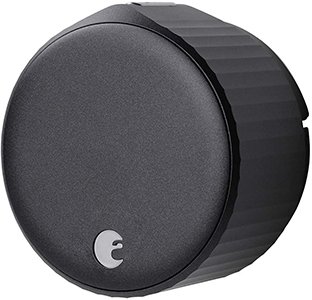
August remains a giant in the US market and an excellent choice globally. Its compact, discreet design attaches to a huge variety of existing deadbolts. Just like the Nuki Pro, the 5th generation has Wi-Fi built right in, simplifying the connection to Alexa and remote access. Its DoorSense™ feature is a fantastic bonus: a small sensor tells you not only if the door is locked, but also if it’s physically open or closed.
 Affiliate link
For Exterior Installation (Full Replacement)
These models replace your existing deadbolt and handle, offering multiple ways to get in beyond just voice and app control.
Yale Assure Lock 2 TouchAffiliate link
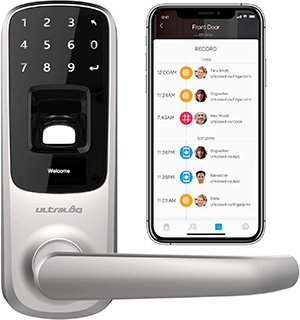
The name Yale is synonymous with traditional lock security, and their Assure Lock 2 line successfully brings that trust into the smart world. The Touch model is a beast, boasting an ANSI/BHMA Grade 2 certification, which guarantees high resistance against forced entry attempts. Its main draw is the lightning-fast and secure fingerprint reader. It also features a backlit keypad for code entry and, of course, full integration with Alexa for voice commands and routines.
 Affiliate link
Aqara Smart Lock U200Affiliate link
Aqara has earned its spot in the smart home hall of fame for its reliability and incredible value. The U200 is a prime example, offering a buffet of access methods few can match: fingerprint, PIN code (with anti-peep obfuscation), an emergency physical key, NFC cards, and crucially, app and voice assistant control. Its Zigbee 3.0 connectivity is a key selling point for smart home enthusiasts, enabling a stable, local integration with platforms like Home Assistant via a robust coordinator, reducing cloud dependency. For Alexa connectivity, it requires an Aqara hub, which can also serve as the brain for the brand’s other sensors.
 Affiliate link
The Ultimate Installation Guide for Your Alexa Smart Lock (2026)
Installing an Alexa Wi-Fi lock isn’t much harder than a standard one, but a few key details can mean the difference between a seamless experience and a major headache.
1. Compatibility Check BEFORE You Buy: This is step zero. Double-check that the model you want is compatible with your door type and lock (e.g., standard American deadbolt). Measure your door’s “backset” (the distance from the edge of the door to the center of the borehole). For retrofit models like Nuki or August, it’s crucial that your existing deadbolt operates smoothly and isn’t stiff.
2. Avoid the “Eager Beaver” Mistake: When you get your lock, the urge to power it on and play with it on the kitchen table is strong. DON’T DO IT. Most smart locks perform a calibration cycle on their first boot-up to learn the door’s orientation and locking points. If you do this in mid-air, it will likely operate backward once installed. Mount it on the door first, then power it on. If you already jumped the gun, perform a factory reset before you install it.
3. Connectivity is King: A smart lock is only as good as its connection.
- Wi-Fi Models: Make sure you have a strong, stable 2.4GHz Wi-Fi signal at your door. A weak signal will cause lag, disconnects, and drain the battery. If needed, consider installing an extender or upgrading to a mesh Wi-Fi system.
- Zigbee/Z-Wave Models: These require a hub. The advantage is that they create their own low-power, highly reliable network. Place the hub in a central location. A device like the SMLIGHT SLZB-06 Ethernet Zigbee Coordinator is an excellent choice for managing a robust local Zigbee network.
4. Read The Freaking Manual: It sounds obvious, but every manufacturer has its quirks. Spend 10 minutes reading the specific instructions for your model. It will save you time and frustration down the road.
Integrating with Alexa and Your Smart Home Ecosystem
Once installed, the real magic begins when you connect your lock to Alexa.
The process is straightforward: in the Alexa app, search for the manufacturer’s “Skill” (Yale, Nuki, August, etc.), enable it, and link your account. Once that’s done, you can use voice commands. For security, the unlock command (“Alexa, unlock the front door”) will require a 4-digit voice PIN that you set up beforehand. Locking does not require a PIN.
Common Alexa Voice Commands for Your Smart Lock:
- “Alexa, lock the front door.”
- “Alexa, unlock the front door.” (She will then ask for your voice PIN)
- “Alexa, is the front door locked?”
The true power is unleashed with Alexa Routines. This is where your lock becomes the trigger for your entire smart home. For example:
- “Goodnight” Routine: When you say “Alexa, goodnight,” you can have her lock the door, turn off all the lights, adjust the thermostat, and arm your security system.
- “I’m Home” Routine: When you unlock the door (either manually or with the app), you can have Alexa welcome you home, turn on the hallway lights, and start playing your favorite Spotify playlist.
This ability to interact with other devices is what transforms a simple smart lock into a cornerstone of a truly connected, secure, and convenient home in 2026.